Tag Archives: Private Schools

Students’ Bio Data Filling: How to complete the new students and 2020 form ones’ admission process by updating their Bio data on NEMIS

The admission process of the 2020 form ones shall be considered complete once their Bio Data has been updated on the National Education management Information System, NEMIS. Once the learner is admitted (See the admission procedure here: NEMIS guide on how to admit new students/ form ones), you will have to then update their details on the NEMIS. The Ministry of Education requires schools to update the Bio data for students in order to:

  1. Enable registration of the learner for the National Hospital Insurance Fund, NHIF, services.
  2. Facilitate disbursement of the Free Secondary Education, FSE, funds for the learner.
  3. Help the Ministry in tracking the learner.

For complete information on all schools in Kenya, including best private and public schools, please visit this link: Schools Portal; Complete guide to all schools in Kenya

HOW TO UPDATE THE LEARNER’S BIO DETAILS.

  1. Visit the NEMIS portal at https://nemis.education.go.ke
  2. Log onto the system by using the official log in credentials; User Name and Password.
  3. Once logged in, click on ‘Form one Admission/ Reported List’
  4. The ‘REPORTED STUDENT LIST’ will be displayed.
  5. Click on ‘BIO DATA’ to update the details for each learner.
  6. Fill in the Basic, Contact and Special Needs Details for the learner. Save the changes.
  7. Repeat procedure 5 and 6; until details for all the admitted learners are captured.

Here are links to the most important news portals:

The ‘LEARNER’ tab, on the NEMIS window, can also be used to carry out the following learner related operations:

  1. PENDING REGISTRATION: View a list of learners whose Registration is pending. These are learners whose details have not been entered as required i.e missing some information like their photographs.
  2. VIEW MY LEARNERS: A menu used to view the list of all learners whose details have been fully updated on the NEMIS system.
  3. LIST OF ADMISSION REQUESTS: Shows the list of admission requests as uploaded onto the NEMIS system for approval by the Ministry of Education’s field officers.
  4. LIST OF PROCESSED ADMISSION REQUESTS: To display the list of learners whose admission requests have been approved by the Ministry of Education’s Field officers.
  5. RECEIVE LEARNER: Used to admit a continuing learner; who has transferred from another school.
  6. RELEASE LEARNER: Used to transfer a learner to join another school after the transfer has been granted by the Education Ministry’s Field Officers.

Also read:

2019 Form ones to report to Secondary schools in the second week of January, chiefs instructed to push all form ones to schools

The 2019 Form ones are expected to report to schools in the second week of January next year, the Ministry of Education says. This will be one week after the continuing students would have reported to schools. According to the Education Ministry’s directive, the new students will be expected in schools from Monday 7th January, 2019, to Friday 11th January, 2019. The Education Ministry has already placed all the 2018 Kenya Certificate of Primary, KCPE, candidates into National, Extra County, County, Sub-county and Private Secondary schools.

In the placement, 31,392 students were placed in National Schools, while Extra County Schools received 129,168 students. County Schools, Sub County Schools and Private Schools received 150,525, 684,515 and 60,356 respectively. A Total 1,021,457 form ones are expected to join Secondary schools next year, 2019.

And in a move to ensure that the 100 percent transition from Primary to Secondary succeeds, the Ministry of Interior has directed Chiefs and Sub Chiefs to ‘push’ all students who would have not reported to form one, by 11th January, 2019, to school. Chiefs and their assistants will physically take all students to nearby schools; if they fail to report to schools where they have been selected to join.

Interior Cabinet Secretary, Dr. Fred Matiang'i, meets a Chief in this file photo. All Chiefs and their Assistants have been instructed to ensure all form ones report to school (Photo Courtesy)
Interior Cabinet Secretary, Dr. Fred Matiang’i, meets a Chief in this file photo. All Chiefs and their Assistants have been instructed to ensure all form ones report to school (Photo Courtesy)

Schools’ heads have also been asked to provide daily updates on the number of form ones who will be joining their schools from 7th to 11th January, 2019. The principals shall then use the Ministry of Education’s online platform to report on the number of unfilled vacancies.

In the new guidelines, released by the Ministry last week, students will only join schools where they have been placed. Parents who may wish to transfer their kids to other schools, will have to make a request at the new school. The principal will then submit the request  submitted to ‘Jogoo House’ (The Education Ministry’s Head Quarters) for action. Placement of the students at the new schools will be subject to availability of vacancies: at the institutions. The selection of students to National, Extra County and County Schools has not gone down well with some parents raising concerns on the schools where their kids have been placed. These parents feel their children did not get placement in ‘good’ schools; corresponding to their performances in KCPE exams.

Parents of parents who failed to get an SMS confirmation on the school where the kids have been placed can log into the Ministry of Education’s Website and try downloading the admission letter for all the categories; National, Extra County and County Schools. Read more details on how to download the Admission Letters, here: How to download 2019 Form one Admission Letters

Related Content:

https://newsblaze.co.ke/2019-form-one-selection-for-extra-county-schools-now-available/

Procedure for admitting 2020 Form Ones through the NEMIS system: Ministry of Education

The admission of the 2020 form ones in all private and public Secondary schools shall be, exclusively, done via the Education Ministry’s National Education Management Information System (NEMIS). Schools can access the list of selected learners on NEMIS.

For complete information on all schools in Kenya, including best private and public schools, please visit this link: 

All schools are instructed to make use of NEMIS in admission of students. The process has been simplified to use only the index number. Care should be taken to avoid entering wrong index numbers resulting in inadvertently admission of the wrong student. Private schools are also expected to admit students through NEMIS.

Required Documents

Here is the complete list of items required for admitting a new student/ form one via the National Education Management Information System, NEMIS:

  1. The admission letter.
  2. The learner’s index number, in full.
  3. The Learner’s Birth Certificate.
  4. The learner’s Unique Personal Identifier, UPI.
  5. The learner’s Contact details: Home county, Home Sub- County, Postal address, E-mail address and Phone Number.
  6. Learner’s passport size photograph.
  7. Learner’s special needs; if any.
  8. Mother’s details: ID Number, Name, E-mail and mobile number.
  9. Father’s Details: ID Number, Name, E-mail and mobile number.
  10. Guardian’s Details: ID Number, Name, E-mail and mobile number.

Here are links to the most important news portals:

The Admission process

Students will present their letters upon arrival for admission. The schools will then verify the existence of their names in the system. The form ones who report to Secondary schools, as placed by the Ministry, will undergo the following admission process:

  1. The form one reports to the school where placed by the NEMIS system and presents the admission letter that must be downloaded from the Education Ministry’s portal at https://www.education.go.ke/index.php/online-services/form-one-selection.
  2. The admission letter is received by the principal or any other individual as may be delegated by the principal.
  3. The Principal or delegated individual will then log onto the NEMIS system by using a smartphone, tablet or computer that has been connected to the internet (Since the admission process can only be executed online). Log onto the NEMIS system by using the official Ministry’s links: https://nemis.education.go.ke/ or https://nemissystem.education.go.ke/
  4. Once logged in (by entering the User Name and Password which is at the disposal of the Principal), Click on the tab indicated as ‘LEARNER’.
  5. From the drop down list, select Admit/Capture request.
  6. On the new window, type in the Kenya Certificate of Primary Education, KCPE, index number on the search UPI/INDEX box and click on search.
  7. The NEMIS system will automatically load, and display, the student’s details showing that the learner is selected to join the school. In case the learner has not been selected to join the school, please advise him/ her to go to the school where the placement has been effected as shown on the NEMIS system or get help from the local Education office. If the student is selected to join the school, then click on ‘ACCEPT PLACEMENT REQUEST‘.
  8. Fill in the required information to successfully complete the admission process. 
  9. Repeat steps 1 to 8, above, for all the 2020 form ones selected to join the school.
  10. You can confirm whether the learners have been captured correctly by Selecting ‘View my Learners’ from the ‘LEARNER’ tab

HOW TO COMPLETE THE ADMISSION PROCESS FOR ALL LEARNERS BY CAPTURING THEIR BIO DATA

The admission process of a learner would be deemed complete once the learner’s Bio data is updated on NEMIS. This can be done by:

  • Clicking on the Learner Tab followed by ‘Capture Biodata for F1 Learners’.
  • Proceed to capture the details as would be required on the Displayed form.

The ‘Learner’ Tab on NEMIS

The ‘LEARNER’ tab, on the NEMIS window, can also be used to carry out the following learner related operations:

  1. PENDING REGISTRATION: View a list of learners whose Registration is pending. These are learners whose details have not been entered as required i.e missing some information like their photographs.
  2. VIEW MY LEARNERS: A menu used to view the list of all learners whose details have been fully updated on the NEMIS system.
  3. LIST OF ADMISSION REQUESTS: Shows the list of admission requests as uploaded onto the NEMIS system for approval by the Ministry of Education’s field officers.
  4. LIST OF PROCESSED ADMISSION REQUESTS: To display the list of learners whose admission requests have been approved by the Ministry of Education’s Field officers.
  5. RECEIVE LEARNER: Used to admit a continuing learner; who has transferred from another school.
  6. RELEASE LEARNER: Used to transfer a learner to join another school after the transfer has been granted by the Education Ministry’s Field Officers.

Also read:

Requesting for Extra Vacancies

Where the capacity of a school has improved due to development of additional facilities in the year, a principal must request for placement of additional students and approval in NEMIS. To achieve this:

  1. Log onto the school’s NEMIS account.
  2. Click on the ‘LEARNER’ tab and select ‘ADJUST SCHOOL F1 CAPACITY’
  3. A window showing the school’s capacity details would be displayed.
  4. Choose the Gender for which you wish to adjust Capacity. Then, enter the new ‘Proposed F1 Maximum Capacity’.
  5. Click on the ‘Save’ button and wait for approval. Once approved, the school can then proceed to admit more learners to fill the available vacancies.


2019 Form one admission letter- The contents of the letter

Most parents/ Guardians have downloaded admission letters for their kids selected to join National, Extra County and County schools from the Education Ministry’s online portal.

But, what are some of the key highlights on the admission letters?
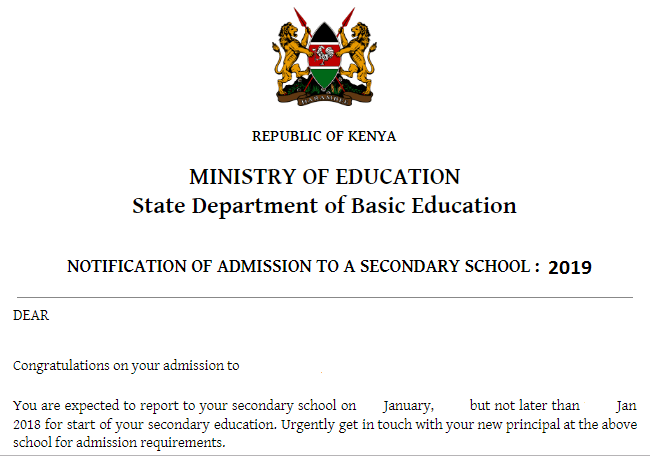
  • All the admission letters bear the Ministry of Education’s letter head as shown in the image below,
  • Name of the student, Index number and Sub County,
  • School admitted to (The Secondary school where the student has been placed),
  • Reporting date; 7th to 11th January, 2019 (Though the letter erroneously indicates the year as 2018).
  • Former primary school’s details; the letter must be stamped by the head teacher, A disclaimer on the letter reads; “This letter will be authenticated on being duly certified by the primary school head complete with a certified copy of birth certificate and finally confirmed by the admitting principal. The letter is issued without any erasure  or alteration and cannot be changed through any form of endorsement whatsoever; utterance of false documents is an offence punishable by law.”
  • The 2019 fee guidelines from the Ministry (The letter gives fees directions thus; “The maximum fees payable per year is detailed in the attached schedule, do confirm the category of your school before making any payment.”)
  • Parents/ Guardians expected to go to schools where their kids have been placed to pick further joining instructions and requirements. (“Urgently get in touch with your new principal at the above school for admission requirements,” says the admission letter from the Ministry.)

2019 form one admission letter

YOU MAY ALSO LIKE:

Team to probe textbooks formed by the Education Cabinet Secretary