Category Archives: KRA Portal

How to apply for Kenya Revenue Authority, KRA, Jobs online; KRA jobs requirements

The Kenya Revenue Authority, KRA, is a state agency responsible for tax matters in Kenya; among other roles. KRA advertises new vacancies from time to time on its official website (https://www.KRA.go.ke)

To apply for KRA jobs this is all what you need to know.

Job Application Guidelines

Registration:

  1. Go to https://erecruitment.kra.go.ke/loginand then click on the ?Register? button to start the application process.
  2. After registration, you will receive an email enabling you to confirm your email address and complete your registration.

Log on:

  1. After registration go to https://erecruitment.kra.go.ke/login
  2. Key in your username and password then click on ?Log in? to access your account.
  3. After successful log in, the system will open the ?Applicant Cockpit?.

Candidate Profile (To create or update applicant detail):

  1. On the ?Applicant Cockpit? page, go to the tab ?Candidate Profile?.
  2. Click on ?My Profile? to create and update your profile.
  3. Follow the instructions to complete your profile.
  4. The process will end by clicking the tab ?Overview and Release?.
  5. Ensure you click the check box on the page to complete the profile.

Application process:

  1. To view the open job postings, click on the tab ?Employment Opportunities? on the ?Applicant Cockpit? page.
  2. Under the heading ?Job Search? click the ?Start? button to view all available vacancies.
  3. Click on the Job posting to display the details of the position.
  4. To apply for the position, click ?Apply? button at the top of the page.
  5. Follow the instructions to complete and submit your application.
  6. Kindly note that all mandatory fields must be completed.
  7. To complete the process of application, click the ?Send Application Now? button after reviewing and accepting the ?Data Privacy Statement?.


In case of any challenges, please send your email query to [email protected]

Job Application Guidelines

Registration:

  • Go to https://erecruitment.kra.go.ke/login and then click on the ‘Register’ button to start the application process.
  • After registration, you will receive an email enabling you to confirm your email address and complete your registration.

Log on:

  • After registration go to https://erecruitment.kra.go.ke/login
  • Key in your username and password then click on ‘Log in’ to access your account.
  • After successful log in, the system will open the ‘Applicant Cockpit’.

Candidate Profile (To create or update applicant detail):

  • On the ‘Applicant Cockpit’ page, go to the tab ‘Candidate Profile’.
  • Click on ‘My Profile’ to create and update your profile.
  • Follow the instructions to complete your profile.
  • The process will end by clicking the tab “Overview and Release”.
  • Ensure you click the check box on the page to complete the profile.

Application process:

  • To view the open job postings, click on the tab ‘Employment Opportunities’ on the ‘Applicant Cockpit’ page.
  • Under the heading ‘Job Search’ click the ‘Start’ button to view all available vacancies.
  • Click on the Job posting to display the details of the position.
  • To apply for the position, click ‘Apply’ button at the top of the page.
  • Follow the instructions to complete and submit your application.
  • Kindly note that all mandatory fields must be completed.
  • To complete the process of application, click the ‘Send Application Now’ button after reviewing and accepting the ‘Data Privacy Statement’.

In case of any challenges, please send your email query to [email protected]

Related content;

KRA Pay As Your Earn, PAYE, tax- Individual Income Tax Bands and Resident Personal Relief

Two Directors arrested for tax evasion worth Kshs.1.4 billion

Two directors of a computer company have been arrested for tax evasion amounting
to Kshs.1.4 billion.
The two Mr. George Bhutto Abiga and Berard Ochieng Okello both directors of Olympus Computer Garage Limited are suspected to have deliberately failed to declare taxes due from sales they made to Mitsumi Computer Garage between September 2014 and August 2016.

Instead, the suspects filed nil returns for Corporation Tax and did not disclose the business transactions.

Further investigations by the Kenya Revenue Authority, KRA, also revealed that Olympus Computer Garage Limited had imported various computer gadgets and accessories such as laptops, flash drives which attract zero duty but are charged 16% Value Added Tax (VAT) as well as Railway Development Levy (RDL), which they also failed to declare.

The company equally failed to file Value Added Tax (VAT) for the year 2014 and instead filed NIL returns for the year 2015 and 2016 intentionally avoiding to declare sales of over Kshs.1 billion.

The two will be arraigned in court on 11th October, 2019. If found guilty, the suspects are likely to be fined an amount not exceeding ten million shillings or double the tax evaded, whichever is higher or to imprisonment for a term not exceeding three (3) years.

KRA has noted that high valued goods are being brought into the country through Jomo Kenyatta International Airport (JKIA) by importers who underdeclare their value hence paying less duty.

The Authority is keenly monitoring all imports through the JKIA and those found culpable will be prosecuted.

How to reset the KRA I- tax Password in case you forgot it.

Did you forget your KRA I- tax Password? Worry not as this can be reset in less than five minutes. Here is the simplified procedure for resetting the password:

  1. Visit the the Kenya Revenue Authority, KRA, I- tax portal by using the address https://itax.kra.go.ke/KRA-Portal/
  2. Enter your KRA PIN/ User ID and click on ‘CONTINUE’.
  3. On the next window, select ‘FORGOT/ RESET PASSWORD’ link at the bottom of the window.
  4. Type in the answer to the Arithmetic ‘SECURITY STAMP’ question then, click on ‘SUBMIT’.
  5. A new password will be automatically E-mailed to your e-mail, if the mail delays just be patient; that is captured at the KRA, during the PIN application process.
  6. Locate the E- mail sent by [email protected] on your Mail inbox and copy the received password.
  7. Go back to the I- tax home page/ log-in page and enter your KRA PIN/ User ID, the E-mailed password. Next, enter the answer to the Security Stamp Question and click on ‘LOG IN’.
  8. The ‘FIRST TIME LOGIN’ window appears. Fill in the following fields:
  • Old password (the e-mailed one)
  • New password
  • choose a security question
  • Enter the answer to the security question, confirm security answer.
  • Check the ‘I AGREE TO THE KRA WEBSITE POLICY AND DISCLAIMER’.
  • Also, check the ‘I HAVE READ THE KRA WEBSITE SECURE PASSWORD POLICY GUIDELINE’.
  • Click on ‘SUBMIT’.

How to easily reset your KRA Password: Ultimate guide

You probably have a Kenya Revenue Authority, KRA, PIN and experiencing troubles logging into your account so as to declare the individual income tax returns. You may not be the only one facing such a scenario. Many Kenyans out there may have forgotten their KRA passwords and are stuck on what the next course of action should be.

Did you know that you can easily reset your password easily? Yes. All that you need to remember is the Email address that was used when applying for your PIN certificate.

RELATED CONTENT
HOW TO RESET YOUR KRA PASSWORD

It is time to reset your password. Follow these simple steps:

  • Visit the KRA iTax portal by using the link; https://itax.kra.go.ke/KRA-Portal/
  • Enter your PIN and click on ‘Continue’.
  • In the next window, select ‘forgot Password/ Unlock Account’.
  • On the new window, insert the correct answer to the displayed arithmetic operation (Addition or Subtraction) and click on ‘Submit’.
  • A new password will be sent to your Email account.
  • Now, open your email (inbox) and locate the mail from KRA. Copy the new password. This password is case sensitive and note the characters correctly
  • Visit the iTax portal and enter your KRA PIN and the new password. Insert the answer to the arithmetic operation and click on ‘Login’.
  • You will be expected to reset your password before proceeding. Remember to use a password that you can easily recall.
For a procedure on how to file your KRA returns click on:

You can also change the email address, in case you can not access/ recover the current address. Change of email address can be initiated by the taxpayer. On the taxpayers profile under registration, the taxpayer is allowed to amend PIN details. Change of email address can be initiated form the iTax profile, under Registration- Amend PIN details. Once the process is initiated by the taxpayer, a task is created for approval by a KRA officer.

For assistance on KRA PIN related problems do not hesitate to contact KRA via:


Here are links to the most important news portals:

KRA news: Tax Agents Charged for Aiding Tax Evasion

Three tax agents were today charged at a Mombasa court for aiding two companies to fraudulently reduce their Value Added Tax (VAT). The two were charged alongside directors of the two companies.

The tax agents from Ogot and Associates, together with directors of Gaab Transporters Limited and Samumu Construction Services were charged with several counts in two separate cases. They appeared before Mombasa Senior Resident Magistrate Christine Ogweno.

In one of the cases, the accused persons, Mohamed Moalin Mohamed, a director of Gaab Transporters Limited as well as Wilson Ogot Owera, David Osore Wesonga and Rolland Anakaya Chiriswa, tax agents to the company, were jointly charged for knowingly making an incorrect statement to the Commissioner for Domestic Taxes in the company’s Value Added Tax (VAT) returns for the months of March, April, May and June 2016 thereby reducing the company VAT liability for the months by Ksh1,593,908.

In the second case, Sammy Kamuio, a director of Samumu Construction Services Limited together with tax agents Wilson Ogot Owera, David Osore Wesonga and Rolland Anakaya Chiriswa, were charged for making an incorrect statement to the Commissioner for Domestic Taxes in the company VAT returns for the month of April 2016 , thereby reducing the company’s VAT liability for the month by Ksh.552,672.

The total amount of tax evaded by both companies amounts to Ksh2,146,580.

All the accused pleaded not guilty in both cases and were released on a bond of Ksh200,000 with an alternative cash bail of Kshs100,000. The two cases will be heard on 17th October 2019.

The court summoned Ali Osman Osman a director of GAAB Transporters Limited, and Abdulhamid Habia Khan and Jones Muthengi Mukuri directors of Samumu Construction Services Limited to appear on 17th October, 2019.

Important links:

Tax laws amendment bill- 2018

Tax laws amendment bill- 2018

Also read;

You may also like:

Quick, Convenient, fast, Cheap and unsecured Mobile loans in Kenya

How to download music and where to download free music

How to file KRA Nil returns on iTax portal

A KRA Nil return is filed by individuals who have the Kenya Revenue Authority, KRA, PINs  but are not formally employed. As thus, such individuals do not pay income tax otherwise referred to as Pay As You Earn (PAYE).

If you have a KRA PIN it is important that you file your returns within the set timelines; usually between January and June of every year. Failure to file Nil returns (just like in other returns) attracts a hefty fine from KRA. 

In case you are wondering how file nil returns, worry not as this is the simplest type of return to file. In fact it takes less than one minute on a good network.

All that you are required to have is your KRA PIN and Password to log into your KRA iTax portal. If by any chance you can not recall your KRA password, you can always easily reset it here.

Related content, click on the links below:
Login into your iTax account and declaring your nil returns.

To log into your iTax portal account and file your returns, follow the steps below:

How to log into the iTax portal

  • Next, insert your password and security stamp. Select ‘Login’.
  • On successful log in, click ‘Returns’ from the menu bar followed by ‘File Nil Return’.

Filing KRA Nil Returns via the KRA iTax Portal.

  • In the new window, select the tax obligation. Available options are: Income Tax Resident – Individual(for Kenyans), Income Tax Non Resident – Individual (For foreigners) and Income Tax- Rental income (for landlords).
  • Click ‘Next’ to access a new window; with your PIN and return period pre-loaded. Enter your spouse’s PIN; but is not mandatory.
  • Select the ‘Submit’ button and a message as the one shown below pops-up;
'itax.kra.go.ke says:
Dear Taxpayer, filing of Nil Returns is
only applicable in cases where you 
have NO transactions to declare for the 
period. Are you sure you want to file Nil
Return?
  • If your answer to the above query is yes, then click ‘Ok’ to complete the return filing.
  • You will now be redirected to a new window titled..’Return Receipt Generated’.
  • Click ‘Download Returns Slip’ to get a copy of your returns file.
  • With this, you could have easily filed your nil returns. Quite easy? Try it for yourself.

KRA Nil returns slip.

KRA- Over 3.6 Million Kenyans file returns by deadline day; Late filing to attract KES 2,000 or KES 20,000 fine

More than 3.6 Million Kenyans have filed their 2018 tax returns as the filing period officially closed on Sunday 30thJune 2019.

The improvement is significant with more than four hundred thousand taxpayers filing their 2018 tax returns compared to last year, which saw 3.2 million Kenyans file their returns by 30th June.

The growth in the numbers show positive progress in tax compliance, a move that will eventually drive the country towards economic self-reliance.

This year, as the deadline approached, Kenya Revenue Authority (KRA) Service Centres did not experience long queues as have been observed during the previous years.

This improvement is attributed to the efficiency of the iTax platform and increased awareness campaign undertaken by the Authority encouraging the early filing of returns as well as on-site filing assistance extended to both individuals and organizations countrywide.

The Kenya Revenue Authority (KRA) acknowledges and appreciates, all taxpayers who turned up to the patriotic call to file their annual tax returns.

All taxpayers should keep in mind that penalty for late filing of annual returns for Income Tax Individual is Ksh.2000 or 5% of tax due whichever is higher, while Income Tax for Non-Individual is Ksh.20,000 or 5% of tax due whichever is higher.

Kenyans are urged to file returns early, beginning January of every calendar year, to avoid last minute rush that comes around the 30th June deadline.

Read also; KRA jobs-how to apply for KRA jobs online

For all your queries on your tax obligation, you can reach KRA through the national contact centre [email protected] or +254 (020) 4999 999, Facebook (Kenya Revenue Authority) and twitter https:// @KRACare. For reference, visit our website, https://www.kra.go.ke.

Read also;

KRA Pay As Your Earn, PAYE, tax- Individual Income Tax Bands and Resident Personal Relief

File your 2021 KRA tax returns online

It is that time of the year that you are supposed to file your 2021 Kenya Revenue Authority (KRA) individual and Nil returns online. Remember that you can file the returns online at the iTax portal (https://itax.kra.go.ke/KRA-Portal/) or by using the iTax Android Mobile App or even visiting your nearest ‘Huduma’ Centre.

How to file nil returns by using the iTax Android Mobile App

Filing your Kenya Revenue Authority, KRA, nil returns has now been made very very easy. This is because KRA has developed a mobile phone Application that enables you file the returns in the shortest time possible.

You no longer need to visit a Cyber to file your returns nor stay in long queues at Huduma Centres.

This guide will show you how to easily file your KRA Nil returns via your mobile phone:

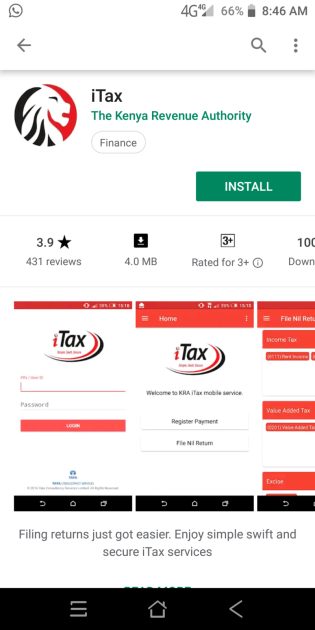
  •  To access the KRA services, download the iTax App by the Kenya Revenue Authority from Google Play Store by using an Android Mobile phone.

Photo- How to install a genuine iTax App from Play Store

  •  Open play store and search for the iTax App by KRA and install it.
  •  Once installed, open the App. A prompt window will emerge asking you to enter your KRA PIN and iTax. password.

Photo- The iTax log in window.


  • Once logged in, click ‘Home’ and select the ‘Income Tax’ Obligation.

Photo- Click on Nil File return.


  •  The tax period will be auto populated by the App. Click on ‘Submit’.

Photo- Selecting Tax Obligation.


  • A message is then generated to confirm that a Nil return is being filed, thus; ‘Dear Taxpayer, filing of Nil Returns is only applicable in cases where you have NO transactions to declare for the period. Are you sure you want to file Nil Return?’ Click on ‘OK’ to confirm.
  •  A success message is populated to confirm Successful filing of the Nil Return, thus; ‘iTax Success: Your return has been filed successfully with Acknowledgement Number (KRA/YEAR/NUMBER). Please visit iTax KRA web portal to view filed return.

And with this, you could have successfully filed your Nil returns. Remember to file your returns before the expiry of the stipulated period as set by KRA to avoid late submission penalties.


RELATED CONTENT

Simplified procedure for filling 2021 KRA returns, online:

Every individual with a PIN has been required to file their income tax returns for every year of income by 30th June of the following year. For this year the deadline will be June 30, 2021. This is a statutory requirement that if not met will attract penalties. Filing of returns also helps you to ascertain that what was deducted from your income as tax by your employer was actually remitted to KRA.

To successfully file your KRA returns the following are required:

  1. An internet enabled device (Mobile phone or computer)
  2. A P9 form from your employer.
  3. KRA PIN.
  4. iTax password.
Here are links to the most important news portals:

STEP BY STEP GUIDE TO FILING YOUR 2021 KRA RETURNS

  1. GETTING YOUR P9 FORM: Ensure you have downloaded, printed or screen shot your P9 form from the TSC online portal at: http://payslip.tsc.go.ke/login.php
  2. LOGGING INTO THE KRA ITAX PORTAL: Then, log into the KRA’s ITax portal by typing: https://itax.kra.go.ke/KRA-Portal/ into your browser.
  3. Enter your KRA pin (read from your P9 form) and click on login. On the next window, enter your password and security stamp and click on (Remember, you can regenerate your password in case you forgot one by using the FORGOT PASSWORD/UNLOCK ACCOUNT hyperlink on the same dialog box).
  4. Once logged in; click on E-Return hyperlink and in the next dialog box, select Tax Obligation as income Tax – Resident Individual. Now click on Next.
  5. DOWNLOADING THE EXCEL SHEET: On the next window. Select.. Click here to download Income Tax- Resident Individual Form (Excel).
  6. FILLING THE EXCEL SHEET FORM. Ensure your computer has Microsoft office Service Pack 2 or higher version of Office.
  7. Locate the excel sheet form and open it and fill in the parts, thus:

SECTION A PART 1:

  1. Personal Identification Number: Your KRA PIN
  2. Type of Return: Original
  • Return Period From: 01/01/2020
  1. Return Period To: 31/12/2020
  2. Do you have any income other than employment income: As Appropriate for your case
  3. Do you have partnership income: As Appropriate for your case
  • Do you have estate trust income?: As Appropriate for your case
  • Has your employer provided you with a car?: NO
  1. Do you have a mortgage?: As Appropriate for your case
  2. Do you have a Home Ownership Savings Plan?: As Appropriate for your case
  3. Do you have a life insurance policy?: As Appropriate for your case
  • Do you have a commercial vehicle?: As Appropriate for your case
  • Do you earn any income from a foreign country?: As Appropriate for your case
  • Have you been issued with the exemption certificate for disability?: As Appropriate for your case
  1. Do you want to declare Wife’s income?: As Appropriate for your case (Though easier when each declares separately)

Related news;

SECTION A PART 2: BANK DETAILS:

  1. BANK NAME: As Appropriate for your case
  2. BRANCH NAME: As Appropriate for your case
  • CITY: As Appropriate for your case
  1. ACCOUNT HOLDER’S NAME: As Appropriate for your case
  2. ACCOUNT NUMBER: As Appropriate for your case
  • SECTION A PART 3: DETAILS OF AUDITOR: As Appropriate for your case
  • SECTION A PART 4: LAND LORD DETAILS (SELF): As Appropriate for your case
  • SECTION A PART 5: TENANT DETAILS (SELF): As Appropriate for your case
  • SECTION A PART 5: TENANT DETAILS (WIFE):

NB: AVOID PART 3-5 IF NOT APPLICABLE.

  • SECTION A PART 6: DEATAILS OF EXEMPTION CERTIFICATE FOR DISABILITY (SELF AND WIFE): As Appropriate for your case
  • SECTION F: DETAILS OF EMPLOYMENT INCOME(SELF & WIFE)
  • PIN OF EMPLOYER: P051098084N
  • NAME OF EMPLOYER: TSC
  • GROSS PAY: (SUBTOTALS + ARREARS as on P9 form)
  • Allowances and benefits from employer (i.e hardship) other than car and housing: As Appropriate for your case


  • SECTION J: COMPUTATION OF MORTGAGE INTEREST (SELF & WIFE): Avoid if not applicable
  • SECTION M: DETAILS OF PAYE DEDUCTED AT SOURCE FROM SALARY (SELF & WIFE)
  • PIN OF EMPLOYER: P051098084N
  • NAME OF EMPLOYER: TSC
  • TAXABLE SALARY: (SUBTOTALS + ARREARS as on P9 form)
  • TAX PAYABLE ON TAXABLE SALARY: PAY AUTO(PAYE) + RELIEF as in P9 form
  • AMOUNT OF TAX DEDUCTED (PAYE): PAY AUTO(PAYE); as in P9 form
  • AMOUNT OF TAX PAYABLE OR REFUNDED (PAYE): Ensure the Amount of Relief displayed here corresponds to that on your P9 form
  • SECTION Q: DETAILS OF INCOME TAX PAID IN ADVANCE (SELF): As applicable for your case. But mostly not applicable for many if not all. Thus, leave it blank.
  • SECTION T: TAX COMPUTATION:
  • No. 11.1: DEFINED/ PENSION CONTRIBUTION: 00
  • No. 12.6: PERSONAL RELIEF: Enter Total MPR Value as in P9 form.
  • No. 13.4: 00
  • No.: 13.5: 00
  • CLICK ON VALIDATE TAB (Check properly that all fields are entered correctly and that the tax due is zero or close to zero!)
  • You will be prompted to save the sheets. Click on yes. Once validated, the form will be saved in drive c..Location Path: C/user/docs/date….._ITR.zip
  • UPLOADING THE FORM:
  • Go back to your ITAX Account on your browser.
  • UNDER THE INCOME TAX-RESIDENT INDIVIDUAL FORM:
  • TYPE OF RETURN: ORIGINAL
  • RETURN PERIOD FROM: 1/1/2018
  • RETURN PERIOD TO: 31/12/2018
  • UPLOAD FORM: Locate the form in drive C and double click on it
  • CHECK THE I AGREE TO THE TERMS AND CONDITIONS BUTTON.
  • CLICK ON

For latest news click on this link: Updated news portal

DOWNLOADING THE E-RETURN ACKNOWLEDGEMENT RECEIPT:

Evidence of upload is very essential. Ensure to save such evidence, just in case..!

  • Once successfully uploaded, a tab “e-Return Acknowledge Receipt” is displayed.
  • Click on it to down load it to your local PC…. Save a soft copy… print a hard copy (Back-up manenos!)
  • Remember to locate a copy of this in your mail box!
  • LOGGING OUT: Remember to log out of your ITax Account… more so if filling @ a cyber café….. For security and integrity reasons!

How to get your KRA Tax Compliance Certificate (TCC) free

Are you in need of a free KRA Tax Compliance Certificate (TCC)? Well. You can now get your certificate free, online.

What is Tax Compliance Certificate (TCC)?

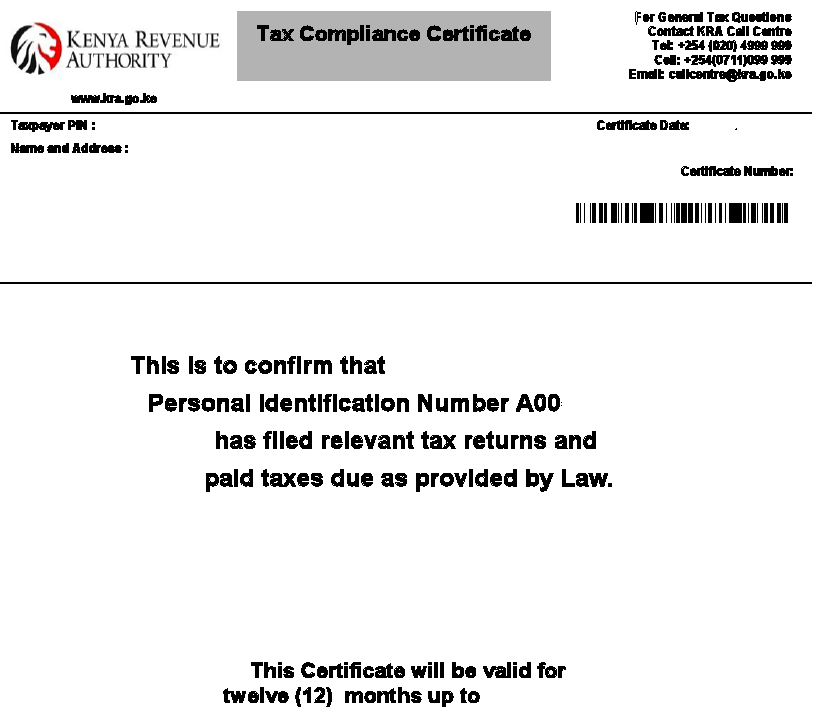
A tax compliance, otherwise known as a Tax Clearance Certificate is an official document issued by KRA, as proof of having filed and paid all your taxes.

KRA issues the following Tax Compliance Certificates upon application:

  • Tax Compliance Certificates for Taxpayers seeking tenders with Government Ministries and Institutions.
  • Tax Compliance Certificates to employees leaving service nor seeking new job opportunities.
  • Tax Compliance Certificates for taxpayers seeking liquor Licenses.
  • Tax Compliance Certificates to Clearing and Forwarding Agents.

Tax Compliance Validity

Tax Compliance Certificates are valid for twelve months only.

Application for a TCC is done through iTax platform and the certificate is sent to applicants’ email address.

You can now check if your Tax Compliance Certificate is valid using the new KRA M-Service App.

Applying for a Compliance Certificate; Step by step process

Taxpayers seeking Tax Compliance Certificate must be compliant in:

  • Filing of tax returns on or before the due date for all applicable tax obligations.
  • Payment of tax on or before the due date.
  • Clearance of all outstanding tax debt.

 How to Apply for a Tax Compliance Certificate

Would you like to get a Tax Compliance Certificate? Well.Follow the simplified process below:

  1. Visit the KRA iTax portal by using the link; https://itax.kra.go.ke/KRA-Portal/
  2. Log into your account by entering your KRA PIN, Password and security stamp value. In case you have forgotten your password,follow this link; Step by step guide on how to reset your KRA password
  3. From your account, locate the ‘Certificates’ tab and click it. From the drop down menu, select ‘Apply for Tax Compliance Certificate (TCC)’.
  4. In the next window enter the reason (s) as to why you need the certificate and click on apply.
  5. To download your certificate,click on the tab indicated ‘Click here to download tax compliance certificate; KRA..’

Please note that where there is any outstanding debt, you will need to pay or apply for a payment plan, which upon approval, enables you to continue with the self-service process.

If you are not in agreement with the liability shown, please contact the Contact Centre on Tel: 020 4 999 999, 0711 099 999 or Email [email protected]. You may also visit the nearest KRA office or Huduma Centre.

See also; How to apply for KRA tax refund plus requirements

Passengers Coming to Kenya to Pay Customs tax for items purchased abroad- KRA announces

Passengers Coming to Kenya will now have to Pay tax for items purchased abroad. The Kenya Revenue Authority, KRA, has announced.

“Remember when travelling you will be allowed to carry personal or household items worth usd500 and below. Anything above the amount shall be subjected to tax.” KRA now says.

Here is your complete guide guide on list of items to be taxed.

PASSENGER TERMINALS

FAQS

AIR PASSENGERS FREQUENTLY ASKED QUESTIONS (FAQs)


1.      What is Customs Duty?

It is a tax imposed on goods brought into Kenya. However various categories of passengers do enjoy concessions and entitlements as provided under the 5th Schedule of the East African Community Customs Management Act.


2.      Are all goods subject to Customs Duty?

Yes; however passengers have a concession of USD 500 applicable only to goods for personal and/or household use. Passengers are also exempt on their used personal effects.


3.      Where and when is Customs Duty paid?

Customs duty is paid at the port of entry on goods subject to taxation. The imported goods may be liable to Import Duty, Value Added Tax, Excise Duty and any other applicable levies, when the allowable limits are exceeded.


4.      Who collects Customs Duty?

Customs Officers who are at the ports of entry verify imported goods and assess the payable taxes on the goods and collect duty on behalf of the Kenyan Government.


5.      How are Customs Duties assessed?

Duties are assessed based on the Customs value of the item and in accordance with the rates provided by East African Community Customs Management Act EACCMA (2004), VAT Act (2013), Excise Act (2015) and any other levies imposed by Government legislation. Customs Valuation is based on the price actually paid or payable for the imported goods.


Note; It is important that passengers declare the actual price of the item.


6.      How are Customs Duties paid?

Customs duties are paid at the appointed banks or through mobile banking platform after the generation of an electronic payment slip. Banks are located within the terminals.

Note, the online payment slip once generated by the Customs Officer will be visible and available at the bank for ease of payment. In case of system failure other payment methods will be advised to ease payments.


PASSENGER TERMINALS

FAQS


AIR PASSENGERS FREQUENTLY ASKED QUESTIONS (FAQs)


7.      How do I verify if the assessed amounts are correct?

The passenger may seek an explanation from the Customs Officer. The passenger has a right to query the assessed Customs duties and Customs Officer is under obligation to demonstrate the correctness.


8.      Are charitable donations liable to Customs duty charges?

Yes, donations into the country are taxable unless exempted by the National Treasury and provisions of the 5th Schedule of the East African Community Customs Management Act.


9.      Who is a resident?

The holder of a valid Kenyan passport and Kenyan resident permit as per the Kenya Citizenship & Immigration Act, 2011.


10.   Are inherited goods liable to Customs duty charges?

No, however it shall be used personal effects which are not for re-sale and have been the property of the deceased person and have been inherited by or bequeathed to the person/passenger to whom they are consigned.


  1. Are used goods imported by passengers liable to Customs duty charges? All goods whether new or use, are subject to taxation. However different passenger categories have different concession and entitlements as here below;


PASSENGER TERMINALS

FAQS


PASSENGER CATEGORIZATION


Category A

This category includes all passengers on first arrival who are bona fide changing their residences to Kenya whether as missionaries, military personnel or Aid Agencies or to take up appointments in commerce or industry. It also includes diplomats, students and other persons resident in Kenya but who have resided outside Kenya for period long enough as prescribed to enable them to comply with the conditions prescribed in Parts A and B of the Fifth Schedule of EACCMA.

Entitlement;

  • wearing apparel;
  • personal and household effects of any kind which were in his personal or household use in his former place of residence;
  • one motor vehicle, which the passenger has personally owned and used outside a Partner State for at least twelve months (excluding the period of the voyage in the case of shipment)


Category B.

Bona fide tourists and visitors to Kenya for periods not exceeding three months. This category includes not only tourists but temporary business and other visitors. Kenya Government has directed that every reasonable facility is to be given to such passengers in the interests of the tourist industry.

Entitlement;

  • Non-consumable goods imported for his personal use during his visit which he intends to take out with him when he leaves at the end of his visit;
  • Consumable provisions and non-alcoholic beverages in such quantities and of such kinds as are in consistent with his visit;
  • That the goods are imported by a returning resident being an employee of an international organization the headquarters of which are in a Partner State and who has been recalled for consultations at the organization’s


Category C.

All returning Kenyan residents and passengers not included in Categories A and B above.


PASSENGER TERMINALS

FAQS


PASSENGER CATEGORIZATION


Entitlement;

  • Wearing apparel;
  • Personal and household effects which have been in his personal use or household use.

Subject to above entitlements, duty shall not be levied on the following goods imported by, and in the possession of a passenger:-

  • Spirits (including liquors) or wine, not exceeding one litre or wine not exceeding two litres;
  • perfume and toilet water not exceeding in all one half litre, of which not more than a quarter may be perfume;
  • Cigarettes, cigars, cheroots, cigarillos, tobacco and snuff not exceeding in all 250 grammes in weight.


The import duty free allowance shall be granted only to passengers who have attained the age of (18) eighteen years.


PASSENGER TERMINALS

FAQS


  1. Is filming equipment liable to Customs duty charges?

Filming equipment being permanently imported into Kenya is liable to full Customs duty.

However, temporary importation of the same will require the importer to secure a permit from the film Classification Board, where a charge of 1% of the total value or Ksh.30,050 whichever is lower is imposed.


13.    Am I supposed to declare currency or monetary instruments?

Yes. Currency and monetary instruments exceeding 10,000 USD or its equivalent MUST be declared at Customs at arrival and before departure.


14.    What other items am I supposed to declare before departing or on arrival?

All restricted items should be declared to Customs on arrival or departure.


15.    Am I required to declare items on departure that I intend to bring back to Kenya?

  • The following items should be declared before departing Kenya:
  • Cameras and accessories for filming outside the country which you intend to

bring back,

  • Items exported for repair or alterations,
  • Tool boxes you require for repair work abroad and you intend to bring back,
  • Jewellery,
  • Sporting equipment,
  • Musical instruments
  • Any item intended to be returned to
  • All temporary importation documents should be retained
  • Note: Kindly retain the Customs payment advice (Form F147) or the bank receipt you receive until your return.


16.    Which passengers are required to make declarations to the Customs Officer?

All passengers are subject to make declarations to the Customs Officer using the

Passenger Declaration Form (Form F88).


17.    What items am I supposed to declare on the Passenger Declaration Form (Form F88) upon arrival?

  • The following items MUST be declared upon your arrival at the port of entry:


PASSENGER TERMINALS

FAQS


  • Items you purchase for business promotion and commercial
  • Items you purchase and are carrying with you upon return to the
  • Items you inherited while
  • Items you bought at duty-free shops on the ship, or on the plane e.g. Spirits, including liquors exceeding one litre or wine exceeding two litres. Perfumes and toiletries exceeding in total one litre of which the perfume should be more than a quarter (250ml). Cigarettes, cigars, cheroots, cigarillos, tobacco and snuff exceeding in 250 grams in
  • The non-consumable goods which will be exported within thirty days or a period not exceeding sixty days from the date the passenger leaves the
  • Repairs or alterations to any items you took abroad and are bringing back, even if the repairs/alterations were performed free of
  • Items you brought home for someone else including
  • Items you intend to sell or use in your business, including business merchandise that you took out of the Kenya on your trip.
  • Currency and monetary instruments over USD 10,000 (or foreign equivalent).


18.    Is it an offence not to declare goods or give false information to the Customs Officer?

Yes, it is an offence under the East African Community Customs Management Act 2004 to give false information to a Customs Officer, and it is punishable under Section 203 of the said Act including forfeiture of the subject goods and other relevant laws.


19.    Are Customs Officers permitted to examine passenger’s luggage and conduct body searches?

Yes, Customs Officers are permitted by the law to examine passenger’s luggage

and conduct body searches when it is deemed necessary.


20.    Are there passengers exempted from Examination of their luggage and body searches by Customs Officers?

Yes, there are passengers exempt from luggage examination and body searches like Diplomats and other privileged persons


PASSENGER TERMINALS

FAQS


  1. Are there any restricted items, either for import/export?
  • The provisions setting out restricted item for import/export are set out in the 2nd and 3rd Schedule of the East African Community Customs Management They include but are not limited to:-
  • Postal franking machines except and in accordance with the terms of a written permit granted by a competent authority of the partner
  • Traps capable of killing or capturing any game animal except and in accordance with the terms of a written permit granted by the Partner
  • Unwrought precious metals and precious
  • Arms and ammunition specified under Chapter 93 of the Customs

Nomenclature.

  • Ossein and bones treated with
  • Other bones and horn-cores, unworked defatted, simply prepared (but not cut to shape) degelatinized, power and waste of these products, Ivory, elephant unworked or simply prepared but not cut to shape, teeth, hippopotamus, unworked o simply prepared but not cut to shape, ivory powder and waste, Tortoise shell, whalebone and whalebone hair, horns, antlers, hoover, nail, claws and beaks, unworked or simply prepared but not otherwise worked shells or molasses, crustaceans or echinoderms and cattle-bone.
  • An unmanned aerial vehicle for example,

All goods the importation of which is for the time being regulated under this Act or by any written law for the time being in force in the Partner State.


22.    Which items are prohibited, either for import/export?

The provisions setting out prohibited items for import/export are set out in the 2nd and 3rd Schedule of the East African Community Customs Management Act. They include but are not limited to:-

  • False money and counterfeit currency notes and coins and any money not

being of the established standard in weight or fineness.

  • Pornographic materials in all kinds of media, indecent or obscene printed paintings, books, cards, lithographs or other engravings, and any other indecent or obscene
  • Matches in the manufacture in which white phosphorous has been
  • Any article made without proper authority with the Armorial Ensigns or Court of Arms of a partner state or having such Ensigns or Arms so closely resembling them as to be calculated to
  • Distilled beverages containing essential oils or chemical products, which are injurious to health, including thijone, star arise, benzoic aldehyde, salicylic, esters, hyssop and absinthe. Provided that nothing in this paragraph contained shall apply to “Anise and Anisette” liqueurs containing not more than 0.1 per centum of oil of anise and distillates from either pimpinella anisum or the star arise allicium verum.
  • Narcotic drugs under international control
  • Hazardous wastes and their disposal as provided for under the Basel Conventions
  • All soaps and cosmetics products containing mercury
  • Used tyres for light commercial vehicles and passengers cars
  • Agricultural and Industrial Chemicals as provided under Item 11, 2nd Schedule of the EACCMA (2004)
  • Counterfeit of all kinds as per provisions of EACCMA
  • Plastic articles of less than 30 microns or conveyance or packing of All goods the importation of which is for the time being prohibited under this Act or by any written law for the time being in force in the Partner State.


23.    Are pets allowed into the country?

Yes, pets are allowed upon securing necessary documentation. However they have to accompanying the passenger.


  1. The Green Channel or Walk through Channel – without any question being asked by Customs is meant for passengers who have nothing to declare and are carrying dutiable goods within the prescribed free allowance. The passengers can simply walk through the Green Channel with their baggage on the basis of their Oral declaration/declaration on their Passenger declaration (Category A & B of Passengers)

PASSENGER TERMINALS

FAQS

  1. The Red Channel is meant for passengers who have something to declare or are carrying goods in excess of the duty free allowance. The passenger hands over the Passenger declaration Form to the Officer on duty at the In case the card is incomplete the Customs officer helps record the Oral declaration (O.D) of the passenger and thereafter he countersigns/stamps the same, after taking the passenger’s signature.


  1. In order to identify the frequent short visit passengers the Customs Officer also generally scrutinizes the passport and other travel documents of the The declaration of goods and their values is generally accepted and duty assessed. On payment of this duty the passenger is allowed clearance.


  1. Any passenger found walking through the Green Channel with dutiable/ prohibited goods or found mis-declaring the quantity, description or value of dutiable goods at the “Red Channel” (the baggage is examined where mis-declaration is suspected), is liable to strict penal action including arrest/prosecution – apart from seizure/confiscation of the offending goods depending upon gravity of violation


  1. On the departure side, the principal task of Customs is enforcement related. These include checks to prevent narcotic drug trafficking, smuggling of other sensitive items including foreign currency, wild life products, antiques, gold etc. It is therefore important for the public to know their obligation &


  1. In order to facilitate the re-import of the high valued articles including jewellery, electronics, golf kits being carried out of the country, the departing passengers may request Customs for issue of a re-export certificate at the time of his/her departure from Kenya.

Kenya School of Revenue Administration (KESRA) training opportunities, requirements and how to apply at https://www.kesra.ac.ke/

Kenya School of Revenue Administration (KESRA) is the Kenya Revenue Authority’s premier training school specializing in Tax and Customs Administration, Fiscal Policy and Management. The School is one of the only four World Customs Organization (WCO) accredited Regional Training Centres (RTCs) in Africa.

KESRA Academic Programmes

Certificate in Tax Administration

Requirements

Overview

This foundation course is designed to inculcate basic skills and knowledge required for entry into the Tax profession. Graduates of the KESRA Certificate in Tax Administration will have the requisite competencies to handle basic taxation for individuals and business enterprises

Duration

 1 Year

Mode of Study

 Day/Evening/Weekend/e-campus
Requirements
KCSE Certificate with a minimum aggregate of C- (Minus) with D+ in Mathematics and English


To apply:

  • Download the Application form by clicking on the Apply button.
  • Fill and submit the application form at Times Tower 8th Floor or KESRA Centre Westlands.

Certificate in Customs Administration

Requirements

Overview

The clearing and forwarding sector plays a critical role in facilitating international trade and logistics, and is therefore an agent of economic development. In the East Africa Region, the sector plays an even more strategic role in the regional integration processes by providing essential services such as Customs clearance, warehousing and transportation. The course is designed to equip learners with the necessary technical skills and professional ethics to responsibly discharge their duties and responsibilities as Freight Forwarding Practitioners. It is critical in ensuring students understand managing transportation documentation, compliance with customs processes and regulations. The EACFFPC Certification is recognized in the East African region by all tax authorities.

Duration

 1 Year


Mode of Study

 Day & Evening
Eligibility
KCSE Certificate with a minimum aggregate of C

To apply:

  • Download the Application form by clicking on the Apply button.
  • Fill and submit the application form at Times Tower 8th Floor or KESRA Centre Westlands.

Here are links to the most important news portals:

Diploma Programmes

Diploma in Tax Administration

Requirements

Overview

The dynamic and increasingly complex fiscal environment requires robust technical skills, knowledge and attitude in tax administration to manage emerging business, financial and economic environment. The KESRA Diploma in Tax Administration is designed to produce well-rounded graduates with the requisite capacity to effectively work in a Tax Administration, tax consultancy firms and audit firms the not-for-profit organizations, corporations and international responsibilities.

Duration

 2 Years


Mode of Study

 Day/Evening/Weekend/e-learning
Eligibility
KCSE Certificate with a minimum aggregate of C (Plain) with C- in Mathematics and English

To apply:

  • Download the Application form by clicking on the Apply button.
  • Fill and submit the application form at Times Tower 8th Floor or KESRA Centre Westlands.

Diploma in Customs Administration

Overview

Requirements

This foundation course is designed to equip learners with basic skills, knowledge and attitude in Customs and its processes. Graduates of the KESRA Certificate in Customs Administration will gain knowledge about global operations of Customs and the requisite competencies to handle Customs Clearance and Freight Operations.

Duration

 1 Year


Mode of Study

 Day/Evening/Weekend/e-campus
Eligibility
KCSE Certificate with a minimum aggregate of C (Plain) with C- in Mathematics and English.

To apply:

  • Download the Application form by clicking on the Apply button.
  • Fill and submit the application form at Times Tower 8th Floor or KESRA Centre Westlands.

Diploma in Maritime Transport Logistics

Requirements

Overview

The Diploma Programme in Maritime Transport Logistics prepares students to build knowledge and skills in the Maritime Industry.

Duration

 2 Years


Mode of Study

 Day/Evening/Weekend/e-learning
Eligibility
Certificate in Maritime Transport Logistics or • Kenya Certificate of Secondary Education (KCSE) with an average grade of C- (Minus) • Equivalent qualifications as determined by Kenya National Examination Council (KNEC) and Kenya Maritime Authority (KMA)

To apply:

  • Download the Application form by clicking on the Apply button.
  • Fill and submit the application form at Times Tower 8th Floor or KESRA Centre Westlands.

Postgraduate Programmes

Postgraduate Diploma in Tax Administration

Requirements

Overview

The Postgraduate Diploma in Tax Administration programme seeks to equip participants with skills, techniques and understanding required in the administration of Domestic Taxes in the private and public sectors of the economy. This programme will transform graduates in the disciplines of economics, business administration, finance, engineering, accounting, mathematics and law to tax administration professionals capable of working efficiently and effectively in a functionally-integrated tax authority as well as offer tax consultancy services to the public.

Duration

 1 Year


Mode of Study

 Day/Evening/Weekend/e-learning
Eligibility
A holder of a Bachelor’s Degree (with at least 2nd class Honors, Lower division) in any discipline from a University or Institution recognized by the commission for University Education (CUE).

To apply:

  • Download the Application form by clicking on the Apply button.
  • Fill and submit the application form at Times Tower 8th Floor or KESRA Centre Westlands.

Postgraduate Diploma in Customs Administration

Overview

Overview

The Postgraduate Diploma in Customs Administration programme seeks to equip participants with skills, techniques and understanding required in Customs administration in the private and public sectors of the economy. It aims at supporting the integration and economic development of East African Community.

Duration

 1 Year


Mode of Study

 Day/Evening/Weekend/e-learning
Eligibility
A holder of a Bachelor’s Degree (with at least 2nd class Honors, Lower division) in any discipline from a University or Institution recognized by the commission for University Education (CUE).

To apply:

  • Download the Application form by clicking on the Apply button.
  • Fill and submit the application form at Times Tower 8th Floor or KESRA Centre Westlands.

Masters Programmes

Master’s in Tax Administration (with specialization in Tax or Customs)

Requirements

Overview

This programme is an innovative and specialist graduate programme designed to impart advanced knowledge of major technical, conceptual and research issues in the areas of tax and customs administration and provide training in the practical and procedural aspects.

Duration

 2 Years


Mode of Study

 Evening/Weekend
Eligibility

New- How to file KRA returns, Nil returns, by using your mobile phone’s iTax App; Simplest procedure

Filing your Kenya Revenue Authority, KRA, nil returns has now been made very easy. This is because KRA has developed a mobile phone Application that enables you file the returns in the shortest time possible. You no longer need to visit a Cyber to file your returns nor stay in long queues at Huduma Centres, here is all you need to do;

How to file nil returns by using the iTax Android Mobile App

1). To access the KRA services, download the iTax App by the Kenya Revenue Authority from Google Play Store by using an Android Mobile phone.

Photo- How to install a genuine iTax App from Play Store

2). Open play store and search for the iTax App by KRA and install it.
3). Once installed, open the App. A prompt window will emerge asking you to enter your KRA PIN and iTax. password.

Photo- The iTax log in window.

4). Once logged in, click ‘Home’ and select the ‘Income Tax’ Obligation.

Photo- Click on Nil File return.

5). The tax period will be auto populated by the App. Click on ‘Submit’.

Photo- Select Tax Obligation.

6). A message is then generated to confirm that a Nil return is being filed, thus; ‘Dear Taxpayer, filing of Nil Returns is only applicable in cases where you have NO transactions to declare for the period. Are you sure you want to file Nil Return?’ Click on ‘OK’ to confirm.
7). A success message is populated to confirm Successful filing of the Nil Return, thus; ‘iTax Success: Your return has been filed successfully with Acknowledgement Number (KRA/YEAR/NUMBER). Please visit iTax KRA web portal to view filed return.

And with this, you could have successfully filed your Nil returns. Remember to file your returns before the expiry of the stipulated period as set by KRA to avoid late submission penalties.

What is KRA Turn Over Tax for traders? A list of all taxes

The Kenya Revenue Authority, KRA, has re-introduced the Turnover Tax (TOT) which will be payable from 1st January 2020. This is in accordance with the Finance Act, 2019. If you are wondering what Turn Over Tax is, who should pay it and how to pay it; then get all the information here.

Who should pay Turnover Tax?

Turnover Tax (TOT) is payable by any resident person whose turnover from business does not exceed or is not expected to exceed Kshs 5,000,000 during any year of income.

Here are links to the most important news portals:

Who shall not pay Turnover Tax?

If you fall in the following categories, then you are exempted from paying the Turnover Tax:

  1. Persons registered for VAT
  2. Persons with business income of Kshs 5,000,000 and above,
  3. Employment Income,
  4. Rental Income,
  5. Limited Liability Companies,
  6. Management and Professional Services among others.

What is the rate for Turnover Tax (TOT)?

The tax rate for TOT is 3% on the gross sales/turnover and is a final tax.

Filing of TOT Returns

TOT will be filed and paid on a monthly basis. The due date is on or before 20th of the following month.

Note

TOT payers are also liable to pay Presumptive Tax at a rate of 15% of the Single Business Permit fee payable or licence payable. However, Presumptive Tax paid will be offset against the TOT payable.

Eligible taxpayers are advised to log onto iTax, add the TOT obligation, file the monthly returns and make payment.

KRA Public notice on Turnover Tax Payment.

LIST OF ALL KRA TAXES

The links below provide complete information on all KRA taxes: