
• Home
  • Contact Us
  • Advertise With Us
  • Latest Education News
    • Teachers’ Resources
    • Teachers’ Resources
    • TSC News Portal
    • KUCCPS portal
    • KCSE Revision Materials
    • KUCCPS portal
    • Knec Schools Exams Portal
    • KMTC News Portal
    • KSSSA Portal
    • Knec Schools Portal
    • Universities & Colleges information
    • Knec Schools Exams Portal
  • NSSF PORTAL
  • NTSA Service Portal
  • KRA Portal
  • Tech News
Newsblaze.co.ke
  • Home
  • Contact Us
  • Advertise With Us
  • Latest Education News
    • Teachers’ Resources
    • Teachers’ Resources
    • TSC News Portal
    • KUCCPS portal
    • KCSE Revision Materials
    • KUCCPS portal
    • Knec Schools Exams Portal
    • KMTC News Portal
    • KSSSA Portal
    • Knec Schools Portal
    • Universities & Colleges information
    • Knec Schools Exams Portal
  • NSSF PORTAL
  • NTSA Service Portal
  • KRA Portal
  • Tech News
  • HELB Portal
  • KNEC News Portal
  • KNEC News
  • Crimes and Courts
  • Health & Nutrition tips
  • Insurance news
  • Jobs
No Result
View All Result
  • Home
  • Contact Us
  • Advertise With Us
  • Latest Education News
    • Teachers’ Resources
    • Teachers’ Resources
    • TSC News Portal
    • KUCCPS portal
    • KCSE Revision Materials
    • KUCCPS portal
    • Knec Schools Exams Portal
    • KMTC News Portal
    • KSSSA Portal
    • Knec Schools Portal
    • Universities & Colleges information
    • Knec Schools Exams Portal
  • NSSF PORTAL
  • NTSA Service Portal
  • KRA Portal
  • Tech News
  • HELB Portal
  • KNEC News Portal
  • KNEC News
  • Crimes and Courts
  • Health & Nutrition tips
  • Insurance news
  • Jobs
No Result
View All Result
Newsblaze.co.ke
No Result
View All Result

Home » How to file KRA Nil returns on iTax portal

How to file KRA Nil returns on iTax portal

by Hillary Kangwana
January 10, 2026
in KRA Portal
Reading Time: 1 min read
A A
0
How to file KRA nil returns through KRA iTax portal https://itax.kra.go.ke/KRA-Portal.

How to file KRA nil returns through KRA iTax portal https://itax.kra.go.ke/KRA-Portal.

A KRA Nil return is filed by individuals who have the Kenya Revenue Authority, KRA, PINs  but are not formally employed. As thus, such individuals do not pay income tax otherwise referred to as Pay As You Earn (PAYE).

If you have a KRA PIN it is important that you file your returns within the set timelines; usually between January and June of every year. Failure to file Nil returns (just like in other returns) attracts a hefty fine from KRA. 

In case you are wondering how file nil returns, worry not as this is the simplest type of return to file. In fact it takes less than one minute on a good network.

All that you are required to have is your KRA PIN and Password to log into your KRA iTax portal. If by any chance you can not recall your KRA password, you can always easily reset it here.

RelatedPosts

What to Do If You Disagree With a KRA Tax Assessment 

KRA allowed to collect Sh2.6 billion in Withholding taxes from Sportpesa winning bets

How to apply for Kenya Revenue Authority, KRA, Jobs online; KRA jobs requirements

Two Directors arrested for tax evasion worth Kshs.1.4 billion

Related content, click on the links below:
  • How to file KRA individual tax returns correctly; What you must have and do.
  • KRA Tax Returns: How to enable Macros in Microsoft Office Excel when filling Individual income tax
  • Step by step guide on how to reset your KRA password
  • Simple procedure on how to file 2020 KRA returns, Nil returns, by using your mobile phone’s iTax App
  • Simple procedure on how to file 2020 KRA returns, Nil returns, by using your mobile phone’s iTax App
  • Step by step guide on how to reset your KRA password
  • P9 form for Public servants from the public service payroll portal https://www.ghris.go.ke/ portal: County and national government employees
  • TSC P9 Form from Payslips Portal: How to download and use the P9 form for TSC Teachers
  • How to file 2020 KRA returns online: Simplified procedure.
  • KRA Turn Over Tax, TOT, for traders: Detailed analysis of all other taxes
Login into your iTax account and declaring your nil returns.

To log into your iTax portal account and file your returns, follow the steps below:

  • Visit the iTax portal by using the address; https://itax.kra.go.ke/KRA-Portal
  • Enter your KRA PIN and click continue.
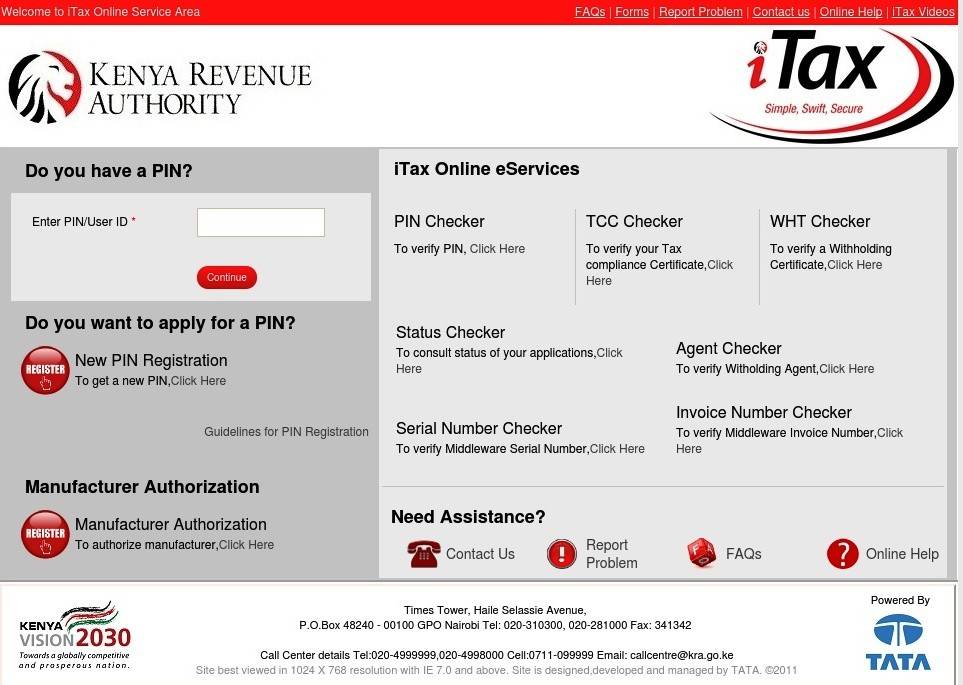
How to log into the iTax portal
  • Next, insert your password and security stamp. Select ‘Login’.
  • On successful log in, click ‘Returns’ from the menu bar followed by ‘File Nil Return’.
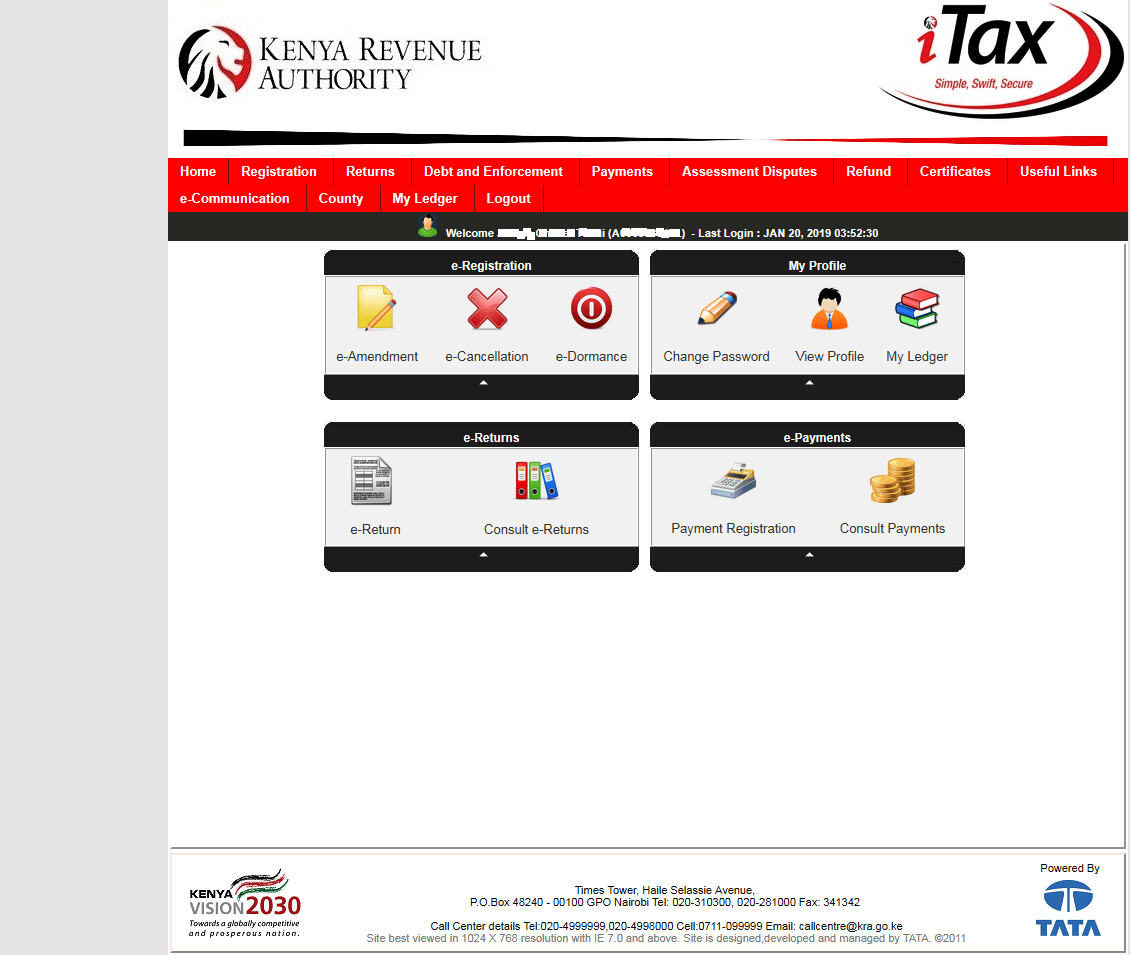
Filing KRA Nil Returns via the KRA iTax Portal.
  • In the new window, select the tax obligation. Available options are: Income Tax Resident – Individual(for Kenyans), Income Tax Non Resident – Individual (For foreigners) and Income Tax- Rental income (for landlords).
  • Click ‘Next’ to access a new window; with your PIN and return period pre-loaded. Enter your spouse’s PIN; but is not mandatory.
  • Select the ‘Submit’ button and a message as the one shown below pops-up;
'itax.kra.go.ke says:
Dear Taxpayer, filing of Nil Returns is
only applicable in cases where you 
have NO transactions to declare for the 
period. Are you sure you want to file Nil
Return?
  • If your answer to the above query is yes, then click ‘Ok’ to complete the return filing.
  • You will now be redirected to a new window titled..’Return Receipt Generated’.
  • Click ‘Download Returns Slip’ to get a copy of your returns file.
  • With this, you could have easily filed your nil returns. Quite easy? Try it for yourself.
KRA Nil returns slip.
Tags: KRA Nil returnsKRA returnsKRA returns online
Previous Post

Sacred Heart Kangaita Secondary School’s CBE Subjects, Pathways, Contacts, Location, Fees, Admission {Full Details}

Next Post

University of Eldoret official reopening dates and instructions

Hillary Kangwana

Next Post
University of Eldoret (UOE) student admission letter and KUCCPS pdf list download.

University of Eldoret official reopening dates and instructions

Leave a Reply

Your email address will not be published. Required fields are marked *

Categories

  • Advertisement (37)
  • Business News (286)
  • Crimes and Courts (39)
  • Featured News (914)
  • FREE KCPE REVISION MATERIALS (1)
  • Health & Nutrition tips (1,424)
  • HELB Portal (143)
  • Insurance news (34)
  • Jobs (247)
  • KCSE Revision Materials (3)
  • KMTC News Portal (508)
  • KNEC News (451)
  • KNEC News Portal (4,110)
  • Knec Schools Exams Portal (28,178)
  • Knec Schools Portal (765)
  • KNUT NEWS (17)
  • KRA Portal (24)
  • KSSSA Portal (418)
  • KUCCPS portal (1,819)
  • KUPPET (24)
  • Latest Education News (27,009)
  • NSSF PORTAL (54)
  • NTSA Service Portal (21)
  • Politics News (4,249)
  • Sports (298)
  • Teachers' Resources (1,940)
  • Tech News (70)
  • TSC Latest News (335)
  • TSC News Portal (2,467)
  • Universities & Colleges information (1,003)
  • Universities and Colleges (403)
  • Home
  • Contact Us
  • Advertise With Us
  • Latest Education News
  • NSSF PORTAL
  • NTSA Service Portal
  • KRA Portal
  • Tech News

All Rights Reserved: Newsblaze Since 2018

No Result
View All Result
  • Home
  • Contact Us
  • Advertise With Us
  • Latest Education News
    • Teachers’ Resources
    • Teachers’ Resources
    • TSC News Portal
    • KUCCPS portal
    • KCSE Revision Materials
    • KUCCPS portal
    • Knec Schools Exams Portal
    • KMTC News Portal
    • KSSSA Portal
    • Knec Schools Portal
    • Universities & Colleges information
    • Knec Schools Exams Portal
  • NSSF PORTAL
  • NTSA Service Portal
  • KRA Portal
  • Tech News

All Rights Reserved: Newsblaze Since 2018

This website uses cookies. By continuing to use this website you are giving consent to cookies being used.