
• Home
  • Advertise With Us
  • Latest Education News
    • Teachers’ Resources
    • Teachers’ Resources
    • TSC News Portal
    • KUCCPS portal
    • KCSE Revision Materials
    • KUCCPS portal
    • KMTC News Portal
    • KSSSA Portal
    • Universities & Colleges information
  • NSSF PORTAL
  • NTSA Service Portal
  • KRA Portal
  • Tech News
Newsblaze.co.ke
  • Home
  • Advertise With Us
  • Latest Education News
    • Teachers’ Resources
    • Teachers’ Resources
    • TSC News Portal
    • KUCCPS portal
    • KCSE Revision Materials
    • KUCCPS portal
    • KMTC News Portal
    • KSSSA Portal
    • Universities & Colleges information
  • NSSF PORTAL
  • NTSA Service Portal
  • KRA Portal
  • Tech News
  • HELB Portal
  • Crimes and Courts
  • Health & Nutrition tips
  • Insurance news
  • Jobs
No Result
View All Result
  • Home
  • Advertise With Us
  • Latest Education News
    • Teachers’ Resources
    • Teachers’ Resources
    • TSC News Portal
    • KUCCPS portal
    • KCSE Revision Materials
    • KUCCPS portal
    • KMTC News Portal
    • KSSSA Portal
    • Universities & Colleges information
  • NSSF PORTAL
  • NTSA Service Portal
  • KRA Portal
  • Tech News
  • HELB Portal
  • Crimes and Courts
  • Health & Nutrition tips
  • Insurance news
  • Jobs
No Result
View All Result
Newsblaze.co.ke
No Result
View All Result

TPAD 2 account for TSC Teachers; Create account, update details and recover password

by Hillary Kangwana
January 11, 2026
in TSC News Portal
0
The new TPAD 2 window for creating and accessing your TPAD account for appraisals.

The new TPAD 2 window for creating and accessing your TPAD account for appraisals.

Before you are allowed to use the new Teachers Service Commission TPAD 2 system, you must first create an account. It is only after you have created a TPAD 2 account that you can now log into the appraisal system. In this guide you will be enlightened on how to create a new TPAD 2 Account, Log in, update your account and recover your password.

STEPS IN SUCCESSFULLY CREATING A NEW TPAD 2 ACCOUNT.

Follow the steps below to create your account;

  • Access the new TPAD 2 system by using the address; http://tpad2.tsc.go.ke/
  • Next, click on ‘Log in’ as shown in the figure below;
    • TPAD 2 log in window.

        TPAD 2 log in window.
  • Now, select user type; Teacher / Deputy, Head of Institution, Curriculum Support Officer, Sub-County Director, County Director / County ICT or Regional Director. The following window will appear;
New TPAD account creation window.
  • You now select the ‘First time Login? Create account’ tab as indicated in the figure above.
  • You will get the window shown below. Enter your details correctly and then click ‘Create Account’.
TPAD 2 account creation. Required information.
  • Enter valid and correct information in the spaces provided. The details entered will be saved to enable login to the system and commence the appraisal process. Ensure the details entered are correct and click on “create account” button for verification and account creation.
  • After the details entered are verified, a login view appears. Here, you should enter the details used in account creations ie. TSC number, ID number and Password for permission access to the system.

Related;

  • TSC- How to fill the TPAD 2 form online

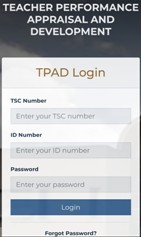
TPAD Login portal

After successful account creation, the information entered is verified by the system and the portal below appears for the user to type in the credentials used at account creation in order to access the system.

After entering the details, click on the “Login” button.

Teachers portal on TPAD 2

Upon successful authentication, the teacher accesses the landingpage/dashboard. Details that appear include:

  • Teachers TSC number,
  • Name,
  • Current institution name,
  • Institutions IPPD code (registration code),
  • Institution level (either primary or secondary) and the users
  • Current designation.

Your Personal Profile

You are required to update your personal profile. To do this;

  • Click on his/her name appearing at the top right corner of the screen,
  • select “My Profile”.
  • Three tabs will be displayed under the “My Profile” feature namely; Personal Information, Teaching Subjects/Subjects Combination and My Password,
  • Update the details, accordingly. After entering all the details, ensure you click on the “Save Changes” button for the changes to be effected in the system.

Changing your TPAD 2 password

On successful login, you can be able to change/reset the current password. To do this, you will be required to type in the current password used and the preferred password.

Fill in the spaces provided the following details: Old password, New password, Confirm password

Click on the “update password” for the new password to be saved.

RECOVERING YOUR FORGOTTEN PASSWORD

Did you forget your password? You can now easily recover/ reset your forgotten TPAD 2 password. To do this, follow these simple steps:

  • From the TSC website;
  • Click “Online services;
  • Select “Teacher Appraisal;
  • Click on “Login”
  • Select your self service portal;
  • Click on to “Forgot Password” tab;
  • The system will prompt you to enter details in the “password recovery” landing page that appears.
  • Enter your TSC Number and ID number correctly in order to recover your password. Click on the “Recover Password” button.
  • A text message will be sent to the declared mobile phone number thus; “TSC-Kenya: Your new password is ‘1…..’”
  • Now, click on the TPAD 2 ‘Login’ tab to enter the code received’. You can change to preferred password by using “My Profile” tab.
Tags: CREATE TPAD2 ACCOUNThttp://tpad2.tsc.go.ke/auth/loginLatest TSC newsLATEST TSC NEWS 2021TPAD LESSON OBSERVATIONTPAD2TPAD2 PORTAL LOGINTSC APPRAISSALSTSC BREAKING NEWS ON PROMOTIONS 2021TSC LIST OF PROMOTED TEACHERS 2021TSC NEWS TODAY 2021TSC PAYSLIPS 2021TSC TPAD2 PORTAL
Previous Post

St Charles Lwanga Ichuni Girls’ High School; KCSE Performance, Location, Contacts and Admissions

Next Post

Approved Covid-19 vaccinating hospitals in Kenya per County

Hillary Kangwana

Next Post
List of MOH approved health facilities to provide free Covid-19 vaccination servicesin Kenya.

Approved Covid-19 vaccinating hospitals in Kenya per County

Leave a Reply

Your email address will not be published. Required fields are marked *

Categories

  • Advertisement (37)
  • Business News (286)
  • Crimes and Courts (39)
  • Featured News (914)
  • FREE KCPE REVISION MATERIALS (1)
  • Health & Nutrition tips (1,424)
  • HELB Portal (144)
  • Insurance news (34)
  • Jobs (249)
  • KCSE Revision Materials (3)
  • KMTC News Portal (508)
  • Knec & Schools News (31,979)
  • KNUT NEWS (17)
  • KRA Portal (24)
  • KSSSA Portal (418)
  • KUCCPS portal (1,819)
  • KUPPET (24)
  • Latest Education News (27,009)
  • NSSF PORTAL (54)
  • NTSA Service Portal (21)
  • Politics News (4,249)
  • Sports (300)
  • Teachers' Resources (1,941)
  • Tech News (70)
  • TSC Latest News (335)
  • TSC News Portal (2,467)
  • Universities & Colleges information (1,004)
  • Universities and Colleges (403)
  • Home
  • Advertise With Us
  • Latest Education News
  • NSSF PORTAL
  • NTSA Service Portal
  • KRA Portal
  • Tech News

© 2026 JNews - Premium WordPress news & magazine theme by Jegtheme.

No Result
View All Result
  • Home
  • Advertise With Us
  • Latest Education News
    • Teachers’ Resources
    • Teachers’ Resources
    • TSC News Portal
    • KUCCPS portal
    • KCSE Revision Materials
    • KUCCPS portal
    • KMTC News Portal
    • KSSSA Portal
    • Universities & Colleges information
  • NSSF PORTAL
  • NTSA Service Portal
  • KRA Portal
  • Tech News

© 2026 JNews - Premium WordPress news & magazine theme by Jegtheme.