• Home
  • Contact Us
  • Advertise With Us
  • Latest Education News
    • Teachers’ Resources
    • Teachers’ Resources
    • TSC News Portal
    • KUCCPS portal
    • KCSE Revision Materials
    • KUCCPS portal
    • KMTC News Portal
    • KSSSA Portal
    • Universities & Colleges information
  • NSSF PORTAL
  • NTSA Service Portal
  • KRA Portal
  • Tech News
Newsblaze.co.ke
  • Home
  • Contact Us
  • Advertise With Us
  • Latest Education News
    • Teachers’ Resources
    • Teachers’ Resources
    • TSC News Portal
    • KUCCPS portal
    • KCSE Revision Materials
    • KUCCPS portal
    • KMTC News Portal
    • KSSSA Portal
    • Universities & Colleges information
  • NSSF PORTAL
  • NTSA Service Portal
  • KRA Portal
  • Tech News
  • HELB Portal
  • Crimes and Courts
  • Health & Nutrition tips
  • Insurance news
  • Jobs
No Result
View All Result
  • Home
  • Contact Us
  • Advertise With Us
  • Latest Education News
    • Teachers’ Resources
    • Teachers’ Resources
    • TSC News Portal
    • KUCCPS portal
    • KCSE Revision Materials
    • KUCCPS portal
    • KMTC News Portal
    • KSSSA Portal
    • Universities & Colleges information
  • NSSF PORTAL
  • NTSA Service Portal
  • KRA Portal
  • Tech News
  • HELB Portal
  • Crimes and Courts
  • Health & Nutrition tips
  • Insurance news
  • Jobs
No Result
View All Result
Newsblaze.co.ke
No Result
View All Result

Home » TSC Email activation online; Simplified guide for all teachers; Easy step by step guide

TSC Email activation online; Simplified guide for all teachers; Easy step by step guide

by Hillary Kangwana
January 11, 2026
in TSC News Portal
Reading Time: 1 min read
A A
0
TSC teachers Email activation online at https://tscsearch.azurewebsites.net/

New TSC Email Activation Step by Step Guide.

EASY TSC EMAIL ACTIVATION GUIDELINES FOR TEACHERS 

The Teachers Service Commission (TSC) requires all teachers to activate their Emails online. The procedure of activating individual official email is as follows:

1. Access the Commission Website (www.tsc.go.ke)
2. Select Online Services and from the drop-down select Teachers
Email Activation.
3. A new page (https://tscsearch.azurewebsites.net/) will load with a
field where you will be required to fill your TSC Number and click
next.

TSC Email activation online

4. A new field requiring your ID Number will appear, fill and click
VERIFY.
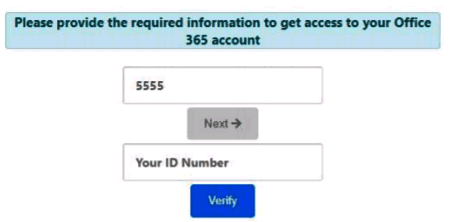
TSC Email activation procedure for teachers.

5. Verify the images and click Verify

RelatedPosts

TSC: 360,000 instructors are unable to use SHA services

TSC list of Promoted Senior Master IV T- Scale 9 Grade C4 Vacancies 2,221

TSC p1 score sheet 2021-2022

TSC new salary structure for teachers 2021- Latest news on new 2021-2025 CBA

TSC Email activation procedure for teachers.

6. Your details which are already uploaded in the Commission System
will be verified.

TSC Email activation procedure for teachers.

7. Click on the icon to view and record you official email and the
temporary password
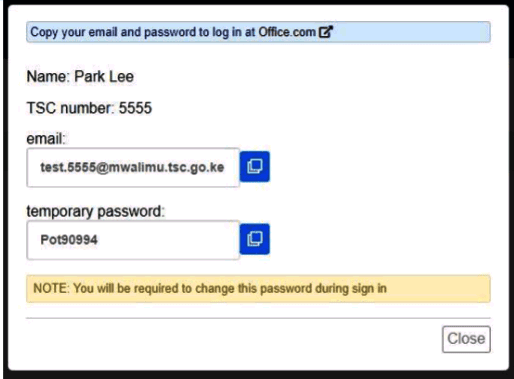
TSC Email activation process for teachers.

8. Click on the office.com to go to the site
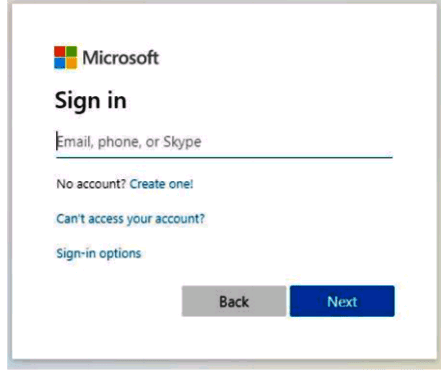
TSC Email activation procedure for all teachers.

Also see; Simple TSC Email activation steps for teachers at https://tscsearch.azurewebsites.net/

9. Enter your email as per the record you had taken

10. Enter the password you had recorded


11. Click next to continue
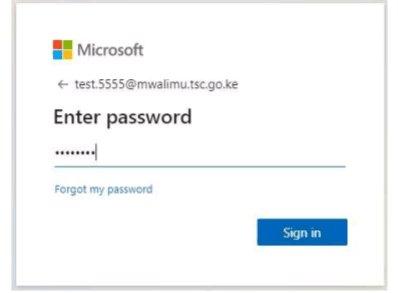
12. Additional information will be needed to secure your account and for future password verification


13. Select I want to set up a different method
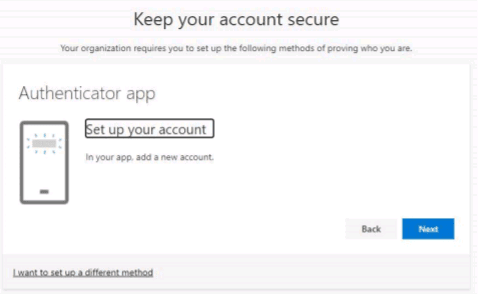

14. Click on the drop-down and select phone

15. Then Click confirm


16. Next field will request for the teacher’s mobile number. This number must be the teacher mobile number, it will be used in future to reset password and carry-out other important Commission Transactions including pay-slip activities.

17. Select the Country and enter the mobile number. This must be your number and you should have the phone with you.


18. Once done as below click Next

19. A code will be received in the phone provided for verification. Enter the code in the space provided as below and click Next.


20. Once the code entered the account will now be activated. Click Next to proceed.


21. Click Done to complete the process.

22. You will now be required to change the password to put yours.


23. Enter the password recorded earlier as the “Current password”, then enter your new password and confirm it. Don’t share this password with anyone as it will compromise your accounts.
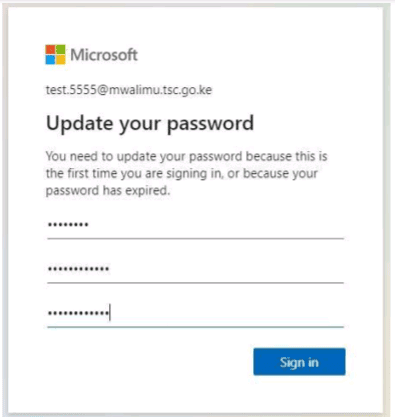
24. The account is now ready for use. Enter the email address and Click Next.


25. Enter the code sent to your phone and click Next
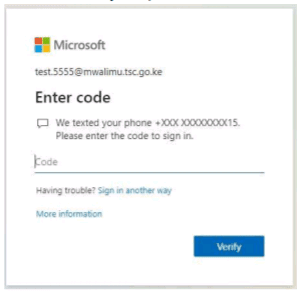
26. Click on the box Don’t show again and select No to proceed.


27. Click on the outlook icon to access your emails.

28. Your email account is now ready for use.


29. Always remember to sign off once done if you are using a public computer.

NB: You can also download outlook app and install into your phone or tablet/iPad for those with smartphones.
For any queries related to the email activation, you can get assistance from the ICT Champion teachers, TSC office near you or you can email to [email protected].

Tags: LATEST TSC NEWS 2021TSC BREAKING NEWS ON PROMOTIONS 2021TSC EMAIL ACTIVATION LINKTSC EMAIL ACTIVATION PROCEDURETSC LIST OF PROMOTED TEACHERS 2021TSC NEWS TODAY 2021TSC ONLINE EMAIL ACTIVATIONTSC PAYSLIPS 2021
Previous Post

Equity’s Eazzy banking mobile App: Get mobile loans easily and quickly

Next Post

Chesamisi High School 2022/2023 KCSE Results Analysis, Grade Count

Hillary Kangwana

Next Post
NTSA: How to acquire an E- Sticker

National transport and Safety Authority, NTSA, How to easily get a Vehicle number plate, Third License Plate, E- plate, electronic plate, motor vehicle transfers, Duplicate log books

Leave a Reply

Your email address will not be published. Required fields are marked *

Categories

  • Advertisement (37)
  • Business News (286)
  • Crimes and Courts (39)
  • Featured News (914)
  • FREE KCPE REVISION MATERIALS (1)
  • Health & Nutrition tips (1,424)
  • HELB Portal (143)
  • Insurance news (34)
  • Jobs (247)
  • KCSE Revision Materials (3)
  • KMTC News Portal (508)
  • Knec & Schools News (31,978)
  • KNUT NEWS (17)
  • KRA Portal (24)
  • KSSSA Portal (418)
  • KUCCPS portal (1,819)
  • KUPPET (24)
  • Latest Education News (27,009)
  • NSSF PORTAL (54)
  • NTSA Service Portal (21)
  • Politics News (4,249)
  • Sports (298)
  • Teachers' Resources (1,940)
  • Tech News (70)
  • TSC Latest News (335)
  • TSC News Portal (2,467)
  • Universities & Colleges information (1,003)
  • Universities and Colleges (403)
  • Home
  • Contact Us
  • Advertise With Us
  • Latest Education News
  • NSSF PORTAL
  • NTSA Service Portal
  • KRA Portal
  • Tech News

All Rights Reserved: Newsblaze Since 2018

No Result
View All Result
  • Home
  • Contact Us
  • Advertise With Us
  • Latest Education News
    • Teachers’ Resources
    • Teachers’ Resources
    • TSC News Portal
    • KUCCPS portal
    • KCSE Revision Materials
    • KUCCPS portal
    • KMTC News Portal
    • KSSSA Portal
    • Universities & Colleges information
  • NSSF PORTAL
  • NTSA Service Portal
  • KRA Portal
  • Tech News

All Rights Reserved: Newsblaze Since 2018

This website uses cookies. By continuing to use this website you are giving consent to cookies being used.