WELCOME TO THE TSC ONLINE LEAVE APPLICATION PORTAL
Teachers Leave Application| # | Date | No. | Type | Starting | Ending | Days | Status | Edit/Withdraw | Attachments |
|---|
Teachers Leave Application| # | Date | No. | Type | Starting | Ending | Days | Status | Edit/Withdraw | Attachments |
|---|
TSC Teacher Profile Update Online- Are you looking for a simplified guide on how to update your profile at the Teachers Service Commission (TSC) online portal? Well. Here is a simple and easy to use seven step guide for you.
Before you embark on the process of updating your profile, it is good to know the required documents and information. Gather the following details:
| S/No. | Required Details |
| 1 | ID No/Passport |
| 2 | Other Name (Optional) |
| 3 | First Name |
| 4 | surname |
| 5 | Kra Pin |
| 6 | Religion |
| 7 | Date of Birth |
| 8 | Gender |
| 9 | Mobile Number |
| 10 | Nationality |
| 11 | Home County |
| 12 | Home Sub county |
| 13 | Division |
| 14 | Zone |
| 15 | Constituency |
| 16 | Constituency |
| 17 | Impairment type |
| 18 | Permanent Post Address |
| 19 | Permanent Post Code |
| 20 | Permanent Town |
| 21 | Current Post Address |
| 22 | Current Post Code |
| 23 | Current Town |

STEP 1: First, Visit the TSC online portal by using the link; https://tsconline.tsc.go.ke/register/update-profile.

STEP 2: In the new window, the following details and Click Next Page Button to Continue: ID Number/Passport Number, Tsc Number, Surname as per Registration Certificate and Your Phone Number.

STEP 3: An SMS with a code will be sent from TSC to the entered phone number. Input the 4-digit verification code sent by TSC via SMS: This code enables the Commission to ensure that it is the respective teacher filling the online form before it updates your profile. Enter the code in the window below and click ‘verify’. In an event you failed to receive the code, select ‘send code again’. The code is a four-digit number.

STEP 4: Proceed to the next window so as to edit your application. Most details have been pre-loaded for you. Click ‘Next’ once done. You will see the success message ‘Your basic details have been updated, proceed to upload other documents’. You will be redirected to a new window.

STEP 5: In the new window, you will update your Academic Qualifications Details. You will also be expected to upload a Minimum of 3 documents and a Maximum of 4. To update a document, click ‘choose file’. Locate the appropriate file in your storage and double click on it to upload it automatically. Click ‘save documents’ every time you upload a document. Repeat this process until you upload all the required documents.

STEP 6: Click ‘Next’ until you complete the process. By now, you would have successfully updated your profile as required by TSC.
You can also use this detailed but simplified guide; TSC Teacher Profile; How to update your profile online and requirements.
TSC Job Application and Promotion Status
TPAD- Teacher Performance Appraisal
Declaration of Income, Assets and Liabilities
Application for Duplicate Certificate of Registration
Access adverts, entry/exit returns and teacher registration services
Update biodata and additional documents
Access Teacher Perfomance, Appraisal & Development
View pension claims that have been delivered to the Treasury
Access payslips, P9 for tax returns and 3rd party services
Get answers to recurrent questions about general HR issues
TSC Teacher Recruitment and Selection
TSC Determination of a discipline case
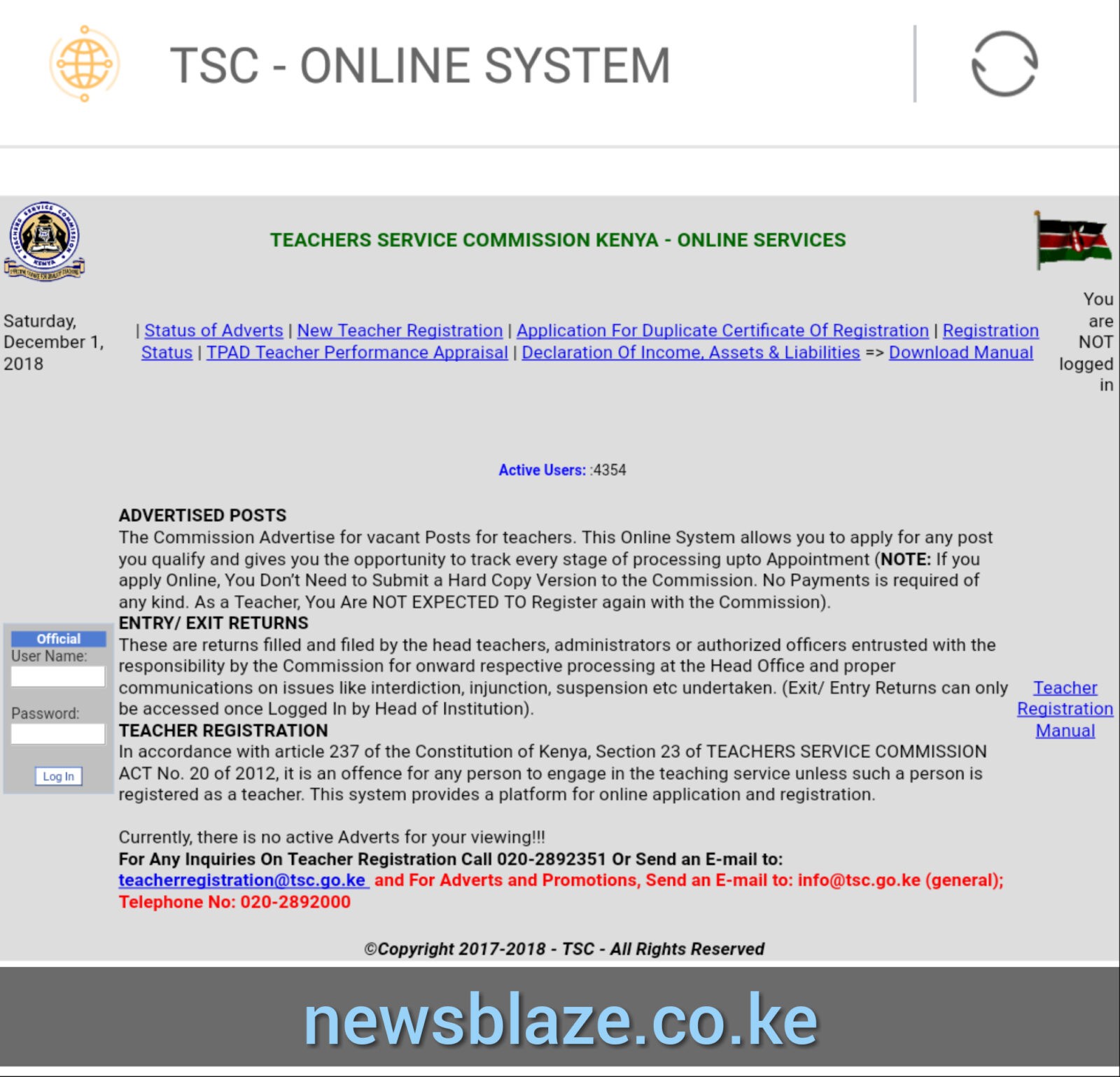
The Teachers Service Commission, TSC, has released a new user manual for Online System Teacher posting, entry and exit. This comes at a time when the Commission has developed a new portal for teacher management.
According to the latest manual from TSC, the Entry/ Exit returns will be submitted online by Heads of Institutions and Sub County Directors to record when a teacher joins or leaves an institution.
The process of Posting must be complete in order for Entry/ Exit process to be initiated.
These returns will then be received online by Human Resource Management (HRM) headquarters for processing. The role of the Sub County Directors will be to submit entry/exit returns for institution administrators and teachers who have exceeded the stipulated 14 days for transfer and 30 days for recruitment.
You can easily access the teachers online portal. To do this, use the simple steps below;
Related; TSC online portal; https://teachersonline.tsc.go.ke/
On the login page, click on forgot password, Key in your TSC number and click continue. A verification code will be sent to your registered mobile number via SMS.
Enter the verification code and click on continue.
Changing Password
To submit an Entry/Exit report, the head of institution must log into the system.
To receive the teachers click on Entry under the Actions menu.
Teachers on duty can leave the institution permanently on retirement or death among others.
To exit a teacher, click on Exit Teacher under the Actions menu.
Note: Teachers on temporary exits are not removed from the list of teachers in the institution but flagged as on leave.
Click button to exit teacher in your institution
In the window which appears, Select date of exit Exit reason Remarks
Heads of Institutions can access reports as displayed below.

Related post; TSC Online Services- The TSC Website, online services and how to easily access them
TSC new online payslip portal at https://tpay.tsc.go.ke/
TSC payslip now available online (Login, view and download payslip)
Latest TSC Payslip Download for this month
TSC payslip online, July now posted (Login, view and download payslip)
Latest TPAY TSC Payslip Online: Login & View Payslip 2024 (All Months)
New TSC Payslip Login Portal- TPay
TSC Payslips Online; TPay Portal Login
TSC payslip online (Register, Login and download your payslip)
The New TSC Payslips Portal Login plus other Teacher Online Services
TSC Payslips Portal – Tpay Login
TSC payslip online (Login, view and download payslip)
TSC payslip online; Login, download payslips and update your profile
Meaning of abbreviations used on the TSC Payslip
How to view your TSC payslip online- Simplified guide
TSC Payslips; Registration, Login, details, password reset and how to download
TSC Payslip and salary for a newly employed secondary school teacher
Latest TSC payslip online (Login, view and download payslip)
TSC payslip online, August (Login, view and download payslip)
TSC payslips online- Here are all the answers to your questions on T-pay
TSC payslip online (Login, view and download payslip)
How to access TSC Payslip Online- TSC Tpay Best Guide
Latest TPAY TSC Payslip Online: Login, View & Download Payslip 2024 Easily
TSC payslip online, October (Login, view and download payslip)
TSC Payslip at https://tpay.tsc.go.ke/
Tpay – TSC Payslips Online Portal
TPAY profile update on TSC Payslips Portal – Simplified Guide
TSC payslips online; Login, register and download payslips (T-pay portal https://tpay.tsc.go.ke/)
TSC Payslip for newly recruited graduate teachers
TSC payslip online, December (Login, view and download payslip)
The Teachers Service Commission TSC has given an update on the Junior Secondary Schools applicants.
To those who had applied for junior secondary teaching posts, you are supposed to give additional information. Visit the TSC website.
Tap on the Junior secondary school applicants additional information collection portal pop up.
You are required to update your gender, date of birth and your preferred Subcounty.
Continue reading;
TSC Online Recruitment Portal 2022-2023
2022-2023 TSC recruitment/ employment guidelines for teachers
TSC Recruitment 2022/2023 – Number of slots per County, Subject
CBC Junior Secondary Subjects (Grade 7, 8, 9)
TEACHERS SERVICE COMMISSION OF KENYA ONLINE SERVICESThe Teachers Service Commission, TSC, provides a wide range of services online. These services can be accessed by online users. The services are mostly accessible to teachers and TSC staff. Here are the services that the Commission offers online:
Online tax deductions card (P)
Teachers and TSC Secretariat Staff can now access their P9 forms online alongside their payslips, through the TSC on-line service portal.
Thus they do not have to wait for June to make their returns. They can now make their tax returns as early as January of every year. To access this service click on; https://payslip.tsc.go.ke/login.php
TSC Website (www.tsc.go.ke):
The Commission has a vibrant website where key activities of the Commission are posted as they happen. The website is also a key resource centre where teachers and the public easily access information on the services offered by the Commission. From the Website;
• Teachers can download various documents such as The Code of Regulations for Teachers, circulars and Gazette notices.
• Teachers can access and apply for advertised posts,
• Retired teachers whose pension claims have been processed and forwarded to the Director of Pensions are notified through the website.
• Papers presented during the First Teachers Conference that was recently concluded can be accessed through the website. To access the TSC Website click on this link; https://www.tsc.go.ke
Teachers online (www.teachersonline.go.ke)
i). Teacher registration
The Commission is mandated to register trained and qualified teachers before they engage in any teaching services in the country.
Through the Commission’s online system, applicants upload the requirements for registration. The Commission processes registration within 30 days and a registration certificate is issued. The status of the application is also provided in the online system. Click here to access the Teacher Registration Portal; https://tsc.go.ke/index.php/our-services/teacher-registration/registration
ii). T-Pay (payslip.tsc.go.ke)
Teachers can now view their latest pay information by accessing their pay slips online. The system also provides a function for teachers to send their latest pay slip to 30 parties such as banks, Saccos, amongst others, to facilitate acquisition of a loan. Access the service by clicking on; https://payslip.tsc.go.ke
iii).Teacher Performance Appraisal and Development (TPAD)
Teachers Performance Appraisal is now done online. The Commission is in the process of reviewing the online performance appraisal so as to make it more user friendly. The Commission has now created a new TPAD portal. Click here to get the service; https://tpad2.tsc.go.ke
iv). Wealth declaration:
Teachers and TSC secretariat staff are required to declare Income, Assets and Liabilities in accordance to the public Officer Ethics Act 2003. This can now be done through the TSC Website under the teachersonline link at; https://tsconline.tsc.go.ke
v). Teacher Management Information System (TMIS)
Effective teacher management requires use of accurate and up to date data. In response to this the Commission has developed an online data collection and analysis system- Teacher Management Information System (TMIS). Data is collected at the source which includes the school, TSC county offices, and the headquarters and is uploaded on the system. TMIS ensures there is a centralized source of data hence eases access of data. Get the service by clicking https://tsconline.tsc.go.ke
Use of email to enhance communication.
The Commission’s email services continue to be a key channel of communication that teachers and other clients use to make enquiries.
This provides clients with a channel that enables them to reach the Commission at a click of a button. Clients can reach the Commission wherever they are, without having to travel to any of the Commission’s offices.
Commission’s social media platforms
The Commission’s social media platform, Facebook page (TSC KENYA) and twitter handle (https://@TSC_KE) are interactive platforms where teachers and other clients interact easily with the Commission. The Commission uses the platforms to post and share events as they happen and also bring to the attention of our clients’ urgent information meant for their attention. You are all encouraged to use the platforms to reach the Commission on any issue that you may have.
Bulk SMS
The bulk SMS platform has enabled the Commission deliver time- sensitive notifications, and other important information directly to the mobile phones of teachers and Secretariat Staff. TSC is now able to send out invitations to teachers for interviews, discipline hearings and cordial messages such as Christmas, Idd Ul Fitr, Easter, New Year’s. It has also been integrated with other systems to give instant feedback such a successful completion of a job application, registration amongst others. The Bulk SMS presents a more cost effective way of communicating to employees as opposed telephone calls or sending letters.
Human Resource Management Information System (HRMIS)
This was developed to enable the Commission manage its human resource. Secretariat Staff now apply for leave, undertake performance appraisal and access medical scheme administration services such as updating their profiles, adding beneficiaries and give feedback about services in hospitals. They also can initiate card replacement and check referral hospitals in the various towns and regions.
The use of technology-based service channels, have improved service delivery greatly by reducing the human interface and providing timely response, accessibility and efficiency. Teachers no longer need to leave their stations to access services. They are able to access them even through their personal phones. I wish to assure you the Commission is committed to automating its services to provide real time services to the teachers and the public.
TSC new online payslip portal at https://tpay.tsc.go.ke/
TSC payslip now available online (Login, view and download payslip)
Latest TSC Payslip Download for this month
TSC payslip online, July now posted (Login, view and download payslip)
Latest TPAY TSC Payslip Online: Login & View Payslip 2024 (All Months)
New TSC Payslip Login Portal- TPay
TSC Payslips Online; TPay Portal Login
TSC payslip online (Register, Login and download your payslip)
The New TSC Payslips Portal Login plus other Teacher Online Services
TSC Payslips Portal – Tpay Login
TSC payslip online (Login, view and download payslip)
TSC payslip online; Login, download payslips and update your profile
Meaning of abbreviations used on the TSC Payslip
How to view your TSC payslip online- Simplified guide
TSC Payslips; Registration, Login, details, password reset and how to download
TSC Payslip and salary for a newly employed secondary school teacher
Latest TSC payslip online (Login, view and download payslip)
TSC payslip online, August (Login, view and download payslip)
TSC payslips online- Here are all the answers to your questions on T-pay
TSC payslip online (Login, view and download payslip)
How to access TSC Payslip Online- TSC Tpay Best Guide
Latest TPAY TSC Payslip Online: Login, View & Download Payslip 2024 Easily
TSC payslip online, October (Login, view and download payslip)
TSC Payslip at https://tpay.tsc.go.ke/
Tpay – TSC Payslips Online Portal
TPAY profile update on TSC Payslips Portal – Simplified Guide
TSC payslips online; Login, register and download payslips (T-pay portal https://tpay.tsc.go.ke/)
TSC Payslip for newly recruited graduate teachers
TSC payslip online, December (Login, view and download payslip)
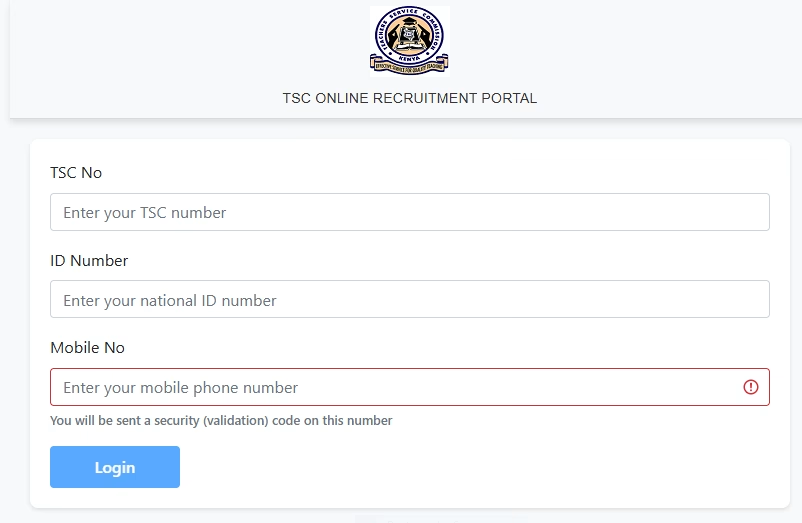
The Teachers Service Commission, TSC, has created an online portal for collection of additional information from Junior Secondary School, JSS, teaching vacancies applicants.
Some of the details include the applicant’s phone number and name.
“Ensure you provide your TSC No, Mobile No, Official Names, County Applied and nature of the problem.” Says the TSC via an online dispatch.
The applicants have up to Friday 30th December, 2022 to update their details.
Read the full presser from TSC, below;
NOTE:
Those who applied for Junior Secondary permanent (9000/DEC/2022) and/or internship (21550/DEC/2022) are required to update and provide additional information.
In case of any challenge, email: [email protected].
Ensure you provide your TSC No, Mobile No, Official Names, County Applied and nature of the problem.
Here is the link to the JSS portal: https://tsconline.tsc.go.ke/teacher/login
Did you know that you can easily check the registration status for your TSC number, certificate, application online? Well. It is now very easy for you to track your registration status via the TSC online portal.
TEACHERS SERVICE COMMISSION OF KENYA ONLINE SERVICES.CLICK HERE TO QUICKLY GET YOUR REGISTRATON PROCESSING STATUS.
TSC new online payslip portal at https://tpay.tsc.go.ke/
TSC payslip now available online (Login, view and download payslip)
Latest TSC Payslip Download for this month
TSC payslip online, July now posted (Login, view and download payslip)
Latest TPAY TSC Payslip Online: Login & View Payslip 2024 (All Months)
New TSC Payslip Login Portal- TPay
TSC Payslips Online; TPay Portal Login
TSC payslip online (Register, Login and download your payslip)
The New TSC Payslips Portal Login plus other Teacher Online Services
TSC Payslips Portal – Tpay Login
TSC payslip online (Login, view and download payslip)
TSC payslip online; Login, download payslips and update your profile
Meaning of abbreviations used on the TSC Payslip
How to view your TSC payslip online- Simplified guide
TSC Payslips; Registration, Login, details, password reset and how to download
TSC Payslip and salary for a newly employed secondary school teacher
Latest TSC payslip online (Login, view and download payslip)
TSC payslip online, August (Login, view and download payslip)
TSC payslips online- Here are all the answers to your questions on T-pay
TSC payslip online (Login, view and download payslip)
How to access TSC Payslip Online- TSC Tpay Best Guide
Latest TPAY TSC Payslip Online: Login, View & Download Payslip 2024 Easily
TSC payslip online, October (Login, view and download payslip)
TSC Payslip at https://tpay.tsc.go.ke/
Tpay – TSC Payslips Online Portal
TPAY profile update on TSC Payslips Portal – Simplified Guide
TSC payslips online; Login, register and download payslips (T-pay portal https://tpay.tsc.go.ke/)
TSC Payslip for newly recruited graduate teachers
TSC payslip online, December (Login, view and download payslip)
Looking at the most efficient, direct and quickest way of Contacting TSC? Worry no more. The Teachers Service Commission (TSC) of Kenya has several ways to be contacted, depending on the nature of your inquiry.
Here are the official contact details for the TSC Headquarters in Nairobi:
| Detail | Information |
| Physical Address | TSC House, Upper Hill, Kilimanjaro Road, Nairobi, Kenya |
| Postal Address |
The Secretary/Chief Executive
Teachers Service Commission
Private Bag, 00100
Nairobi, Kenya |
| General Phone Line | +254 (0) 20 289 2000 |
| Toll-Free Line | 0800 221 477 (For reporting indiscipline cases) |
| Email (General) | [email protected] |
| Email (Discipline) | [email protected] (Directorate of Quality Assurance and Standards) |
For any related enquiries, please contact the Director, Human Resource Management and Development, through email [email protected] or Tel: 0725895824
Continue reading: TSC Human Resource direct Communication Phone Numbers, Email Addresses
| Area of Inquiry | Phone Number |
| General Inquiries | 020 289 2000 |
| Teacher Registration | 020 289 2351 |
| Adverts and Promotions | 020 289 2000 |
| Reporting Fraud (Director Staffing) | 020 289 2193 |
| Reporting Fraud (Deputy Director – Staffing) | 020 289 2131 |
Queries on;TSC Transfers,Promotion, Pension , Registration, Recruitment, Employment etc COMMUNICATE DIRECTLY WITH YOUR HR AT T.S.C HQ THROUGH THE FOLLOWING CONTACTS;
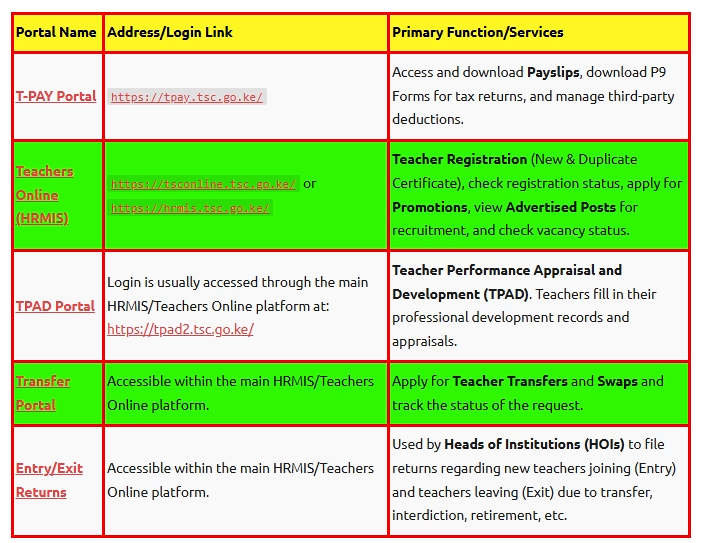
Here are the main TSC Portals and their primary functions:
| Portal Name | Address/Login Link | Primary Function/Services |
| T-PAY Portal | https://tpay.tsc.go.ke/ |
Access and download Payslips, download P9 Forms for tax returns, and manage third-party deductions. |
| Teachers Online (HRMIS) | https://tsconline.tsc.go.ke/ or https://hrmis.tsc.go.ke/ |
Teacher Registration (New & Duplicate Certificate), check registration status, apply for Promotions, view Advertised Posts for recruitment, and check vacancy status. |
| TPAD Portal | Login is usually accessed through the main HRMIS/Teachers Online platform at: https://tpad2.tsc.go.ke/ | Teacher Performance Appraisal and Development (TPAD). Teachers fill in their professional development records and appraisals. |
| Transfer Portal | Accessible within the main HRMIS/Teachers Online platform. | Apply for Teacher Transfers and Swaps and track the status of the request. |
| Entry/Exit Returns | Accessible within the main HRMIS/Teachers Online platform. | Used by Heads of Institutions (HOIs) to file returns regarding new teachers joining (Entry) and teachers leaving (Exit) due to transfer, interdiction, retirement, etc. |
Here a step by step guide on how to access the various TSC Portals:
The Teachers Service Commission, TSC, has released a new procedure for updating teachers’ details on the Teachers Management Information System, TMIS.
To update the teachers’ mobile phone numbers on TMIS by the HOI, use the following steps:
a) On the TMIS home, click on ‘TEACHERS’ tab indicated as 4. Teachers. This opens a list of all teachers in the institution.
b) Move to the rear right of the window, and click on edit icon under the ‘ACTION’ column.
c) The teacher’s details will be opened in edit mode.
d) Enter the verified teacher’s mobile number correctly and save the changes by clicking on the ‘SAVE’ icon; under the ‘ACTION’ column.
e) Repeat this for all teachers at the institution.
The Teachers Service Commission (TSC) is responsible for the registration, recruitment deployment, and management of teachers. This essentially means that the Commission manages the process of transferring teachers in the country.
Teachers may seek transfers for various reasons, including personal preferences, family considerations, health issues, or professional growth. Understanding the procedure is essential for the smooth transition.
Here is a guide on how to apply for teacher transfer:
Who initiates Teacher Transfers?
How to Apply for a Transfer
Teachers can log in to the TSC website, fill in the application details, upload the required documents, and submit their application online.
Tracking Your Transfer Status
Upon approval, the teacher receives a transfer letter detailing the new station and reporting date. This letter is typically sent through the school or directly to the teacher.
Reporting to the New Station
Key Considerations for Transfer
The approval of a transfer request
depends on several factors:
Timing of Transfers
To minimize disruption to school programs, transfers are scheduled during school holidays.
Who Effects Teacher Transfers?
Teachers Responsibility after
Approval
Once a transfer is approved, transferred teachers are required to be released from their current station and report to the new station within the stipulated time period.
Teacher transfer is supported by an online application system that aids in reducing unnecessary travel and wait times at TSC headquarters.
By understanding the outlined procedures and utilising the available digital tools, teachers can navigate to check on transfer status with ease.
TSC TMIS portal: The Teachers Management Infiormation System, TMIS, is an online platform used by the Teachers Service Commission, TSC, to manage teachers’ records. The portal contains such teacher details as: Personal details, date employed, date appointed to current grade, age, teaching subjects and workload.
Also see: How to update teachers’ mobile phone numbers on TMIS
TMIS portal is also used to file entry and exit returns for all teachers in a school. These are returns filled and filed by the head teachers, administrators or authorized officers entrusted with the responsibility by the Commission for onward respective processing at the Head Office and proper communications on issues like interdiction, injunction, suspension etc undertaken. (Exit/ Entry Returns can only be accessed once Logged In by Head of Institution).
Continue reading:TSC TMIS Portal (https://www.teachersonline.go.ke)
All newly posted teachers are expected to have their details updated at the TMIS portal. Without having these details in the current station, one will miss out on the TSC online services like filing Teacher Performance Appraisal and Development (TPAD) records.
TMIS is a module in teachers’ online services that captures the following in an
institution;
Mobile numbers and basic details of teachers are updated on the page for Teachers
details. Below are the steps to follow to access Teachers online services and upload
mobile numbers.
To access Teachers online (TOS), use any of the methods below;
These methods will take the user to the TMIS home page.
Step 1: To log into the system, input your username as TSC Number and password as welcome (for a new user who has not changed password). The window below is displayed.

Enter a new password and retype the same. Click save.
Step 2: On a successful login, the following window will be shown.

Now you can be able to capture or edit such details as: Deployment, Entry/ Exit Reports, TMIS returns among others.
Here is your complete guide: TMIS guide for all teachers
To update a teacher’s mobile number in the Teacher Management Information System (TMIS), you can:

Heads of institutions are also responsible for updating teachers’ mobile numbers in TMIS. They must do this within 30 days of all teachers in the institution activating their emails.
You can access the TMIS portal by:
Typing https://teachersonline.tsc.go.ke into your browser’s address bar
You can contact the Teachers Service Commission by: Calling the Safaricom hotline at 0722208552, Calling the Telkom hotline at 0777208552, and Emailing [email protected]